Laravel's New @fonts Blade Directive Kills the Web Font Boilerplate
Laravel 13.x adds a @fonts Blade directive backed by a Vite font runtime, turning self-hosted Google, Bunny, and Fontsource fonts into one line of markup.
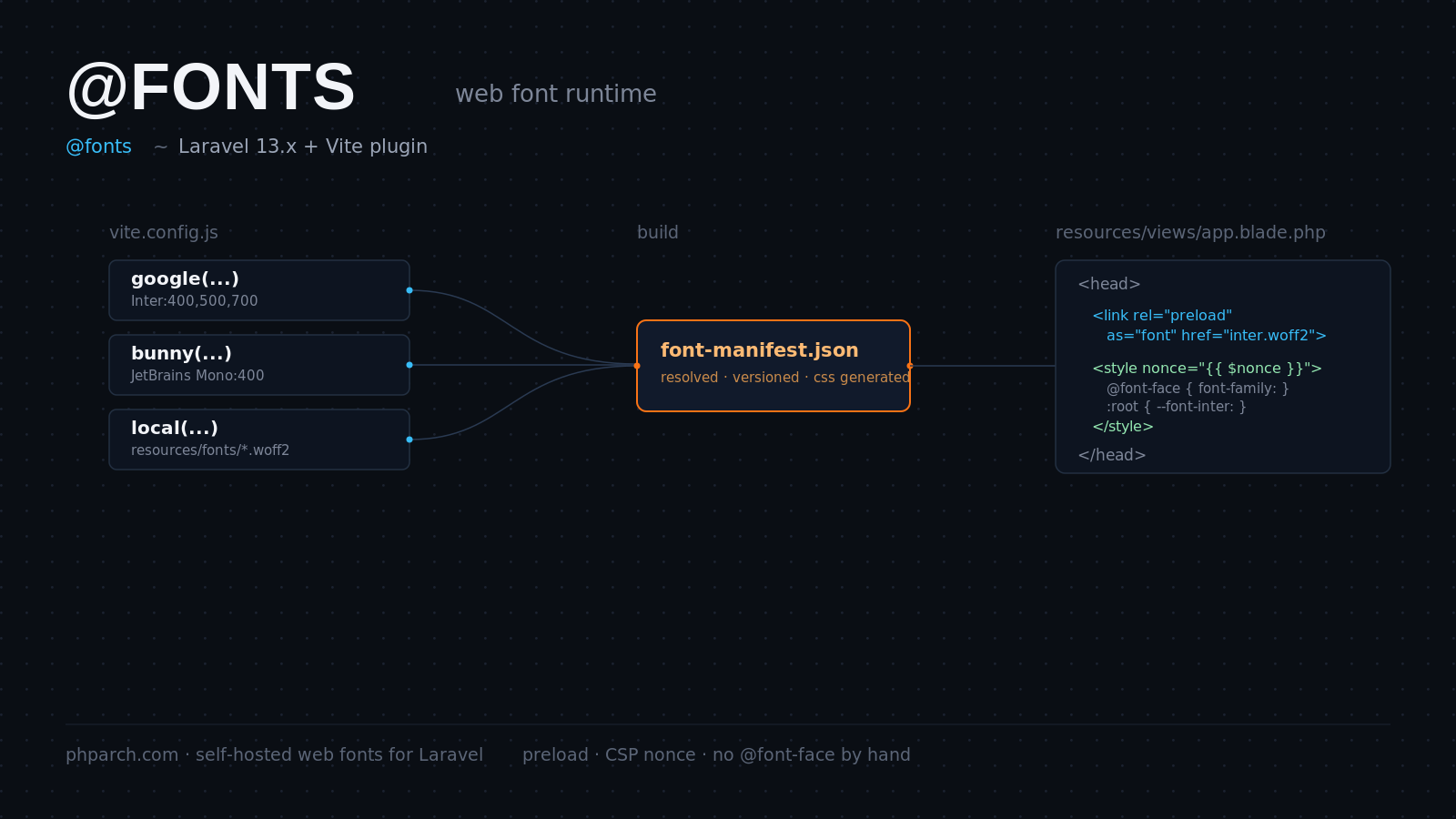
Every Laravel project eventually needs a custom web font, and every Laravel project has, until now, solved that problem the same tedious way. You download the font files, drop them somewhere under resources, write a block of @font-face rules by hand, add <link rel="preload"> tags in the right order so the browser does not discover the font late, and if your app runs a strict Content Security Policy, you hand-roll a nonce onto the inline style block too. Get any of that wrong and you pay for it in layout shift or a flash of invisible text.
A new addition to the Laravel 13.x line collapses that entire checklist into a single Blade directive. It is a @fonts directive backed by a font optimization runtime inside the Laravel Vite plugin, contributed by Wendell Adriel and merged into the framework and the laravel-vite-plugin package. It ships configured out of the box in all of Laravel’s starter kits, so if you spin up a fresh app today you already have it wired in.
What the directive actually does
The mental model is simple. You configure the font families you want in vite.config.js. When Vite builds (or serves) your assets, the plugin resolves the font files for each configured family, emits them as versioned Vite assets, generates the matching @font-face CSS, and writes a font manifest. The @fonts Blade directive reads that manifest at render time and prints a preload <link> for each font file plus an inline <style> block containing the @font-face rules and CSS custom properties for that family.
You drop it in the <head> of your root layout, right alongside the directive you already know:
<head>
    <meta charset="utf-8">
    @fonts
    @vite(['resources/css/app.css', 'resources/js/app.js'])
</head>
That is the whole integration. No manual font file management, no copy-pasted @font-face block, no preload tags to keep in sync by hand.
Configuring fonts in vite.config.js
The Laravel Vite plugin ships provider helpers for the sources most PHP shops actually reach for: Google Fonts, Bunny Fonts, Fontsource, and plain local font files. You import the helper for the provider you want and hand it to the plugin’s fonts option:
import { defineConfig } from 'vite';
import laravel from 'laravel-vite-plugin';
import { google } from 'laravel-vite-plugin/fonts';

export default defineConfig({
    plugins: [
        laravel({
            input: ['resources/css/app.css', 'resources/js/app.js'],
            fonts: [
                google(['Inter:400,500,700', 'JetBrains Mono:400']),
            ],
        }),
    ],
});
Say you are building an internal tool for a shop like phparch.com and you want body copy in Inter and code samples in JetBrains Mono. That config is the entire setup. Run npm run build, and the plugin downloads the font files at build time, bundles them as first-party assets, and writes the manifest the directive needs.
If a specific page only needs a subset of your configured families, pass an alias to filter the output. Say a landing page only needs the display font and not your monospace family:
@fonts('inter')The directive and the underlying Vite::fonts() facade method both accept these aliases, so the same filtering works whether you are calling it from Blade or from PHP directly.
Why self-hosting the font matters more than it sounds
The obvious win is speed. Every third-party font request is a fresh DNS lookup and a fresh TLS handshake to a domain the browser has never talked to before that page load. Self-hosting removes that hop entirely and pulls the font onto the same origin, and often the same HTTP/2 connection, as the rest of your critical assets.
The second win is quieter but has been a live legal question for European companies since 2022, when several German courts held that embedding Google Fonts directly from Google’s servers transmits a visitor’s IP address to Google without consent, triggering GDPR liability. Self-hosting sidesteps that argument completely, because the font never leaves your infrastructure. If you have clients in the EU, that alone is worth the five minutes it takes to switch a <link href="fonts.googleapis.com/..."> tag over to this directive.
The third win is that the plugin does not just drop the files locally, it wires them into Laravel’s existing asset pipeline. The preload links the directive emits are picked up automatically by the AddLinkHeadersForPreloadedAssets middleware, so those same fonts get advertised as HTTP/2 preload push candidates without any extra configuration on your part. And because the directive is built on the same facade as @vite, CSP nonce support comes along for free. If your application already calls Vite::useCspNonce() in middleware, the inline font styles pick up the same nonce automatically, closing a gap that used to require manually threading a nonce attribute onto a hand-written <style> tag.
Build and dev mode both work the same way
The directive behaves consistently whether Vite is running its dev server or you have run a production build. In dev mode it resolves the fonts on the fly through the Vite server; in build mode it reads the compiled manifest. That parity matters, because font loading bugs are exactly the kind of thing that look fine locally and then break in a way you only notice after a client complains about a flash of unstyled text in production. With one directive doing both, that class of environment drift mostly disappears.
A note on local fonts and licensing
If you are self-hosting a commercial font rather than a Google or Bunny font, the plugin’s local font provider handles the packaging, but the licensing terms are still on you. Nothing about this feature changes what you are legally allowed to redistribute. Check your font license before you commit font files to a public repository, the same rule that applied before this feature existed and will apply after.
Should you switch existing projects over
If you are maintaining an older Laravel app with a hand-rolled @font-face block, this is a low-risk refactor. Move the font declaration into vite.config.js, swap the manual style block for @fonts, and delete the preload tags you were maintaining by hand. The bulk of the win is on greenfield projects and starter-kit apps, where it means you never write that boilerplate in the first place. Either way, the direction is clear: Laravel is folding one more piece of frontend performance tuning into the framework’s own conventions instead of leaving it to a blog post you have to remember to follow.