cpx 2.0: PHP Finally Has Its Own npx
cpx 2.0 runs any Composer package command without installing it. Local binaries win by default, aliases are yours to define, and agents get JSON output.
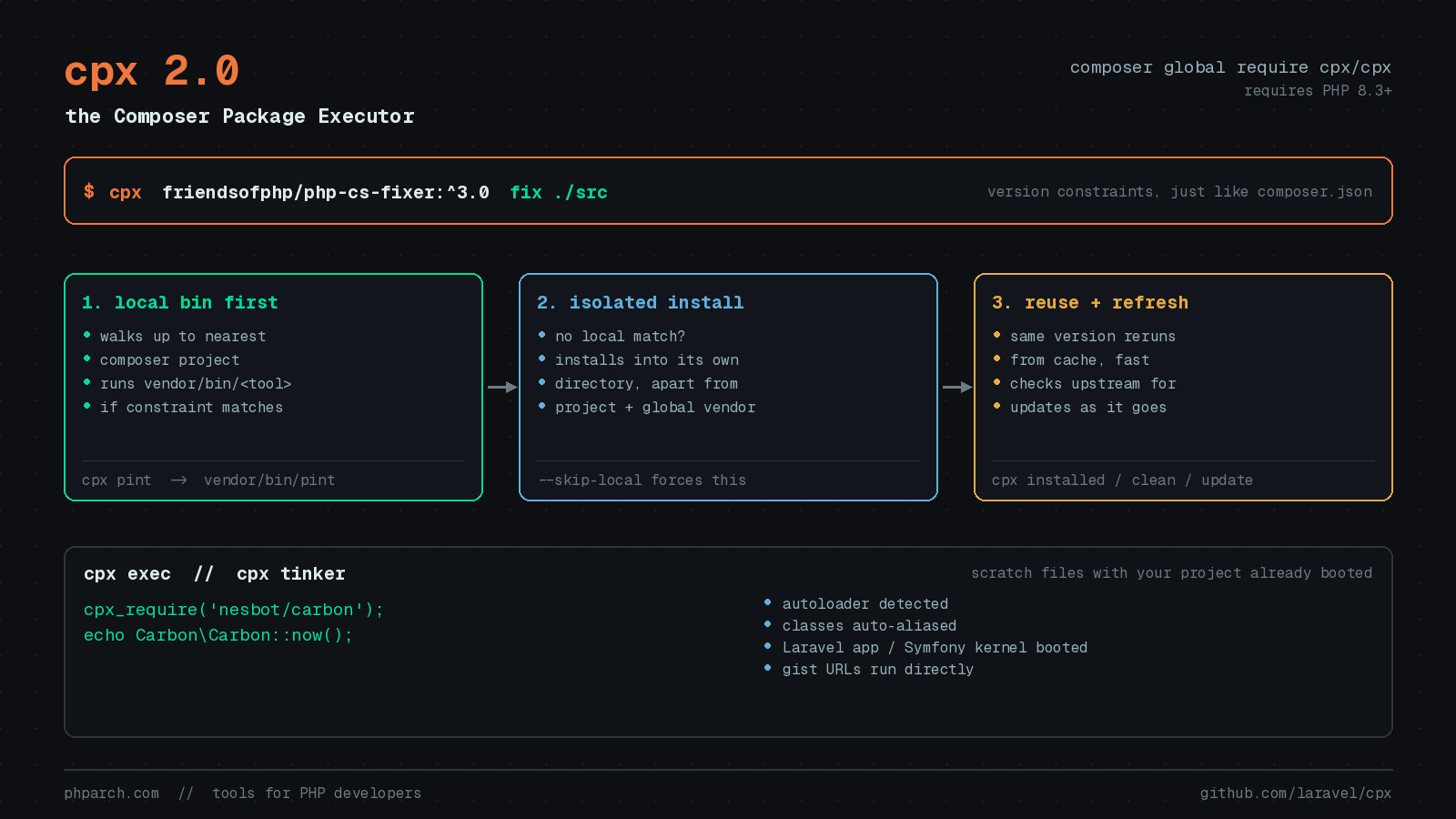
Every PHP developer has the same folder of regret somewhere on their machine: a global Composer install stuffed with tools they needed once. PHPStan for that one audit. php-cs-fixer because a client project used it instead of Pint. phploc from 2019. And then one day composer global update blows up because two of those tools want incompatible versions of nikic/php-parser, and you spend twenty minutes untangling dependencies for software you are not even writing.
Node developers solved this years ago with npx. PHP has now caught up. cpx 2.0, a full rewrite of Liam Hammett’s original Composer Package Executor, landed as a first-party laravel/cpx package and was demoed by Taylor Otwell during his day one keynote at Laracon US 2026 in Boston.
The basic move
Install it once, globally:
composer global require cpx/cpxcpx is safe to install this way precisely because it has no runtime Composer dependencies of its own. It ships as a self-contained PHAR with everything bundled inside, so it adds nothing to your global conflict surface. It requires PHP 8.3 or higher.
From there, pass a package name and a command:
cpx friendsofphp/php-cs-fixer php-cs-fixer fix ./srcVersion constraints work exactly as they do in composer.json:
cpx friendsofphp/php-cs-fixer:^3.0 php-cs-fixer fix ./srcIf a package exposes a single binary, or the binary name matches the package name, drop the command entirely:
cpx friendsofphp/php-cs-fixer fix ./srcBehind the scenes cpx installs the package into its own isolated directory, separate from both your project’s vendor tree and your global Composer setup, and runs the binary from there. Repeat runs of the same package reuse that installation and start fast, unless you ask for a different version or cpx notices an update is available, since it checks upstream as it goes. If a package ships more than one binary and you do not name one, 2.0 prompts you to pick, or you can name it up front with --bin.
Local binaries win by default
This is the behavior change that matters most if you used cpx 1.x, and it is the thing that makes cpx safe to reach for inside a real project.
cpx now looks for the binary in your project before it installs anything. It walks up from the current directory to find the nearest Composer project and runs the matching binary from that project’s configured bin-dir, which is vendor/bin unless you have changed it.
cpx pint                 # runs vendor/bin/pint when the project has it
cpx phpunit --filter=Foo # runs vendor/bin/phpunit when present
cpx laravel/pint:^2.0    # uses the local pint only if it satisfies ^2.0
So cpx pint inside a project runs the version that project pins, not whatever is newest on Packagist. That is the correct default. Formatting a client codebase with a newer Pint than the team agreed on is a great way to produce a diff nobody asked for. When there is no matching local binary, cpx falls back to the isolated copy. Pass --skip-local before the package name to force the isolated one.
Aliases are yours now
Version 1.x shipped a hardcoded list of shortcuts for popular packages. That list is gone. You define your own:
cpx alias phpstan/phpstan phpstan
cpx alias laravel/pint
Leave off the alias name and it defaults to the package’s short name, so the second line gives you cpx pint. Aliases live in ~/.cpx/, cpx aliases lists them, and cpx unalias <name> removes one. You can alias a specific binary of a multi-binary package too.
Two housekeeping commands worth knowing: cpx installed shows every package you have run through cpx and when you last used it, and cpx clean removes the ones you have stopped reaching for (--all nukes everything). Note that cpx list now shows cpx’s own commands, which is standard Symfony Console behavior, rather than installed packages.
The part I did not expect: exec and tinker
cpx exec and cpx tinker are the features that turned this from “nice utility” into something I actually use daily.
cpx exec script.php
cpx exec -r 'echo PHP_VERSION;'
cpx exec https://gist.github.com/user/id
cpx tinker
The value here is not that it runs PHP. php script.php already does that. The value is everything cpx does before your code runs.
Composer’s autoloader is detected in the current directory or any parent, so your project classes just work. Classes used without an import get aliased where cpx can find a match, which means no use statement archaeology in a throwaway script. In a Laravel project the whole application boots, with config, facades, .env, and $app all live. In a Symfony project the kernel boots and you get $kernel and $container in scope. Pass --no-boot to skip that.
Inside those scripts, cpx_require() pulls in a package on demand:
<?php

cpx_require('nesbot/carbon');

$publishDate = Carbon\Carbon::parse('2026-11-01');

echo $publishDate->diffForHumans();
That is a scratch file testing a date calculation against a package the project does not have installed, without touching composer.json. If you have ever polluted a project’s dependencies to answer a five-second question, you know what this saves.
Gist support is the other pleasant surprise. cpx exec <gist-url> downloads and runs it against your current directory. Multi-file gists prompt you to choose, or you append the file anchor from the gist page to skip the prompt. Appending a SHA pins a revision, and setting GITHUB_TOKEN gets you past GitHub’s rate limit. For a team at php[architect] passing around a one-off data fix script, that beats “paste this into tinker and hope.”
Your code runs in its own PHP process, so it cannot collide with cpx’s bundled dependencies, and exit() codes pass through correctly. That last detail matters if you script any of this in CI.
In a Laravel project with laravel/tinker installed, cpx tinker hands off to your project’s own php artisan tinker and forwards arguments like --execute. Everywhere else it opens a PsySH shell with your project booted, which is a genuinely useful thing to have in a plain Symfony or vanilla PHP codebase.
Agent-aware output
cpx detects when it is not attached to an interactive terminal. That covers stdin being redirected, --no-interaction or -n being passed, and running inside an AI coding agent, which it identifies through laravel/agent-detector.
In that mode, child processes get no TTY, prompts fall back to their defaults, and the management commands (installed, aliases, alias, unalias, clean, update) return a single line of JSON:
{
    "success": true,
    "errors": [],
    "summary": {
        "packages": [
            { "name": "laravel/pint", "last_run": "2024-01-02 03:04:05" }
        ]
    }
}
Package runs stream only the underlying tool’s output, with cpx’s own progress rendering suppressed, and cpx-level failures such as an unrecognized command or an uninstallable package are reported as JSON too. Pass --json to any of those management commands to get the same output from an interactive terminal. Overwriting an existing alias non-interactively requires --force.
I have gone back and forth on whether AI-agent affordances in CLI tools earn their design cost. This one does. An agent parsing decorated console output to learn whether a package installed will eventually parse it wrong. A single JSON line is unambiguous, and the flag is there for humans who want jq.
Should you switch?
If you are on cpx 1.x, the 1.x series is frozen and no longer supported. The upgrade guide covers the move, and the two things that will bite you are the removed built-in aliases and the new local-binary preference.
If you have never used it, the honest pitch is narrow but real: it does not replace your project’s dev dependencies and it should not. PHPStan, Pest, and Pint belong in composer.json where CI can see them. What cpx replaces is the junk drawer of globally installed tools you touch a few times a year, plus the awkward gap between php -r and a full scratch project.
That is a smaller problem than “PHP needs a package runner” makes it sound. It is also a problem I hit most weeks.
Sources
- laravel/cpx README and command reference — GitHub
- CPX: The Composer Package Executor for PHP — Laravel News, July 31, 2026
- Everything we announced at Laracon US 2026 — Laravel Blog, July 29, 2026
- cpx.dev — official landing page
- cpx 1.x to 2.x upgrade guide — GitHub
- Introducing cpx, Composer Package Executor — Liam Hammett