Move Buckets Without a Big-Bang Sync: Laravel's Read-Through Disk
Laravel 13.26 adds a read-through filesystem driver that stacks a new disk over the old one and promotes files on first read, no bulk sync needed.
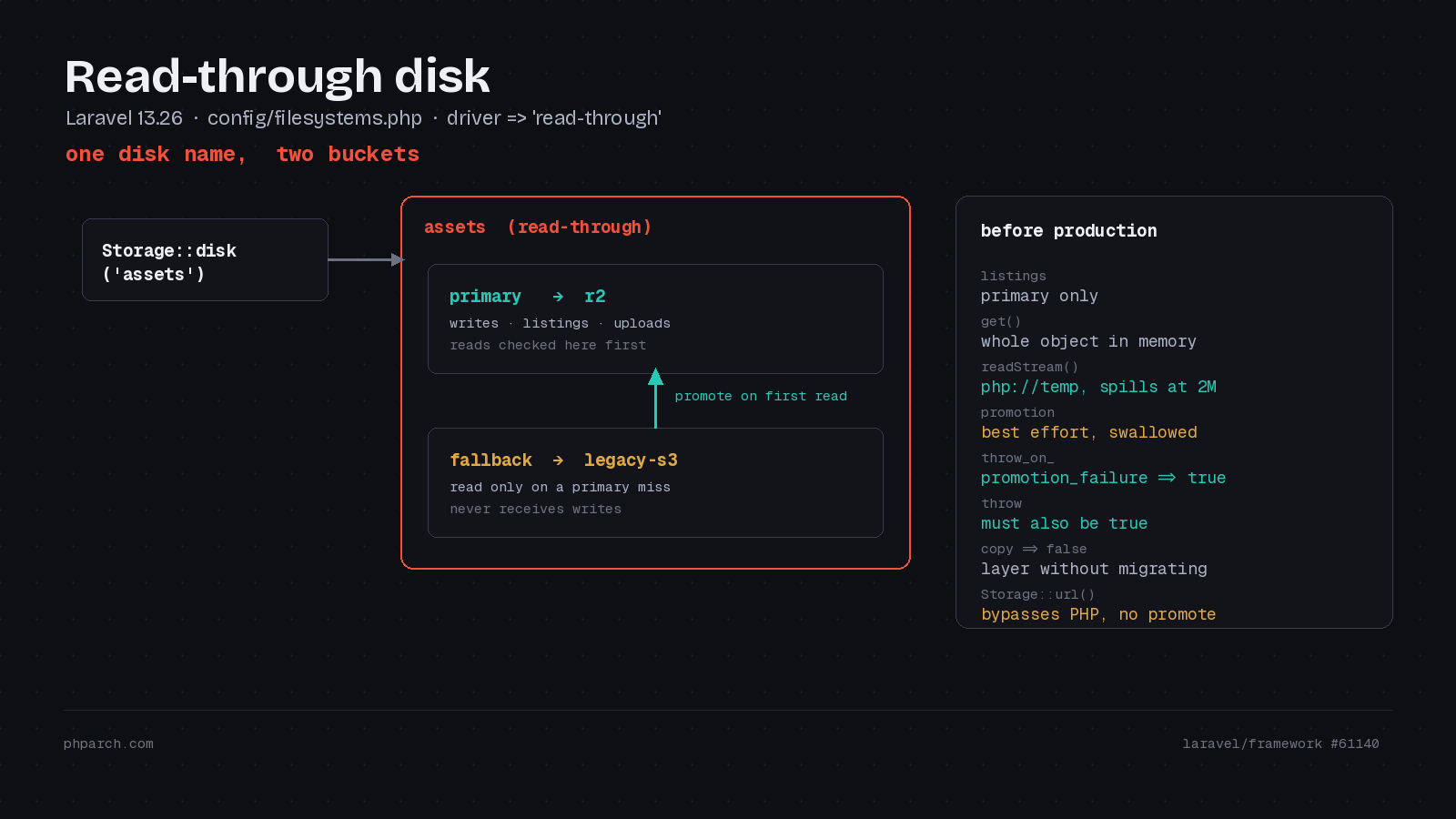
The worst part of moving object storage is not the decision. It is the weekend you lose to aws s3 sync, watching a progress counter crawl through four million files, most of which nobody has opened since 2021. You pay egress on every one of them. And when it finishes, you still have to hold your breath during the cutover deploy, because the moment you flip the disk name, anything the sync missed becomes a 404 for a paying customer.
The usual workaround is worse. Somebody adds a helper that tries the new disk, catches the miss, and falls back to the old one. Six months later that helper has metastasized into eleven controllers, three jobs, and a Blade component, and nobody remembers whether it is safe to delete.
Laravel 13.26 puts that pattern inside the disk itself. The new read-through driver, contributed by Taylor Otwell in #61140 from a suggestion by Aaron Francis, composes two ordinary disks into one logical disk. Your application keeps calling Storage::disk('assets') and has no idea two buckets exist.
The configuration
A read-through disk names a primary and a fallback in config/filesystems.php:
'disks' => [

    'r2' => [
        'driver' => 's3',
        // Cloudflare R2 credentials...
    ],

    'legacy-s3' => [
        'driver' => 's3',
        // the bucket you are leaving...
    ],

    'assets' => [
        'driver' => 'read-through',
        'primary' => 'r2',
        'fallback' => 'legacy-s3',
    ],

],
Both primary and fallback accept either a configured disk name, as above, or an inline configuration array if you would rather not register the underlying disks separately. The pair is validated when the disk resolves, so a missing side, the same disk on both sides, or a disk that points at itself throws an InvalidArgumentException up front rather than failing on the first customer download.
Any adapters that support the operations you use can be composed. S3 can feed R2. A local disk can feed object storage. Because scoped disks are just disks, you can even use this to migrate between key prefixes inside a single bucket, with one scoped disk on legacy/ and another on current/.
What the read path actually does
The interesting behavior is the miss. Laravel checks primary, misses, reads fallback, then checks primary a second time before writing. That second check exists because a concurrent request may have already promoted the file. If it has, Laravel throws away the bytes it just downloaded and reads primary instead of overwriting it.
That is a real protection, but the Laravel engineering post on the driver is candid that the check and the write are still separate operations, so a write can land between them. If your application overwrites paths in place, coordinate writes during the migration window. If your keys are immutable or versioned, which is what you want anyway, the race cannot bite you.
The routing rules are worth memorizing before this goes in front of production traffic:
| Operation | Disk | Promotes? |
|---|---|---|
get, readStream | primary, then fallback | yes, by default |
exists, size, mimeType, lastModified | whichever holds the file | no |
put, writeStream, makeDirectory | primary only | n/a |
files, directories | primary only | n/a |
move | primary, then fallback | deletes the fallback source |
copy | primary, then fallback | leaves the fallback source |
url, temporaryUrl | whichever holds the file | no |
temporaryUploadUrl | primary only | n/a |
Two of those rows are sharp edges.
Directory listings come from primary only. Any code that iterates a directory to find work will simply not see unpromoted files. If you have a nightly job that walks exports/ and emails whatever it finds, that job goes quiet the day you cut over. Point it at the fallback disk explicitly, or rewrite it to read from your database instead of from a bucket listing, which is the better long-term answer anyway.
Delete semantics are the row to verify against your installed version, because the published accounts do not agree. Laravel’s engineering post describes deletes as removing the path from both stores, fallback first and then primary, specifically to prevent a “ghost delete” where a file you removed gets promoted back on the next read. Laravel News, covering the same release, describes deletes as targeting primary only, with exactly that resurrection called out as a gotcha. Write a test against your actual version rather than trusting either description:
use Illuminate\Support\Facades\Storage;

it('does not resurrect deleted objects', function () {
    Storage::disk('legacy-s3')->put('invoices/phparch-2026-09.pdf', 'x');

    Storage::disk('assets')->delete('invoices/phparch-2026-09.pdf');

    expect(Storage::disk('assets')->exists('invoices/phparch-2026-09.pdf'))
        ->toBeFalse();
});
If that fails, your source bucket needs delete permission on the credential you gave Laravel, and you should keep application-level tombstones until the fallback is retired.
Memory, and the get() trap
get() pulls the whole object into a PHP string before it promotes. On a 4 KB avatar that is nothing. On a 600 MB conference video from the PHP Architect archive it is a memory_limit incident with extra steps.
readStream() is the answer. On a fallback hit it copies the source into a php://temp stream, writes that to primary, rewinds, and hands the stream back. PHP keeps php://temp in memory until it passes 2 MB and then spills to a file in the system temp directory, per the stream wrapper documentation. You trade memory for temp disk and for the latency of a download plus an upload inside that first request, so size your temp volume and your request timeouts accordingly.
return response()->stream(function () use ($path) {
    $stream = Storage::disk('assets')->readStream($path);

    fpassthru($stream);
    fclose($stream);
}, 200, ['Content-Type' => 'video/mp4']);
The failure mode you get by default
Promotion is best effort. If the fallback read succeeds and the write to primary fails, you get the file and the exception is swallowed. No event, no report. The reasoning is defensible: a full destination bucket should not take your downloads offline.
That default also means a permissions typo can leave you migrating nothing for a week while everything looks healthy. Flip it while you are validating:
'assets' => [
    'driver' => 'read-through',
    'primary' => 'r2',
    'fallback' => 'legacy-s3',
    'throw_on_promotion_failure' => true,
    'throw' => true,
],
Note that both flags matter. throw_on_promotion_failure turns a failed copy into an UnableToReadFile, but the disk’s ordinary throw option decides whether your code ever sees it. With throw left at false, get() catches the exception and hands you null.
Reading without copying
#61155 from jimbojsb added a copy option for the case where you want the layering but not the migration:
'assets' => [
    'driver' => 'read-through',
    'primary' => 'local-assets',
    'fallback' => 'production-s3',
    'copy' => false,
],
With copy => false, fallback hits are served straight through and nothing is written. The use case in the pull request is a development environment seeded from a production database snapshot, where every row references a file that only lives in the production bucket. Your local app renders correctly without slowly mirroring a terabyte onto a laptop. Give that fallback disk read-only credentials and it doubles as a safety rail.
It is also a sensible phase one for a real migration. Cut reads over, watch your error rates for a few days, then turn promotion on.
The cold tail is still yours to move
Traffic-driven promotion moves the working set, not the bucket. Objects nobody requests stay on fallback forever, and if you serve most files through Storage::url(), the bytes never pass through PHP at all, so almost nothing promotes. URL generation resolves against whichever disk holds the file and copies nothing.
So the endgame still involves a bulk copy, just a much smaller and cheaper one:
- Add the destination disk and repoint your existing disk name at a read-through pair.
- Let application traffic promote the hot set. New uploads land on primary from day one.
- Enumerate the fallback with paginated provider listings and dispatch background copy jobs that skip anything already on primary. Avoid
allFiles()on a bucket with millions of keys, it returns an array. - Verify key counts, sizes, and checksums where the providers expose them.
- Replace the read-through disk with a plain disk on the destination, revoke the fallback credentials, and retire the source.
Rollback between steps one and five is a config change, because the source bucket never stopped being complete. That property is the whole reason to do it this way.
Sources: Laravel engineering blog, Laravel file storage documentation, Laravel News, framework #61140, framework #61155.