MySQL 26.7 Hands the Thread Pool to Community, and PHP-FPM Is Why You Care
The thread pool plugin left Enterprise in MySQL 26.7. For PHP-FPM shops, it changes what an idle connection costs. Here is how to size it.
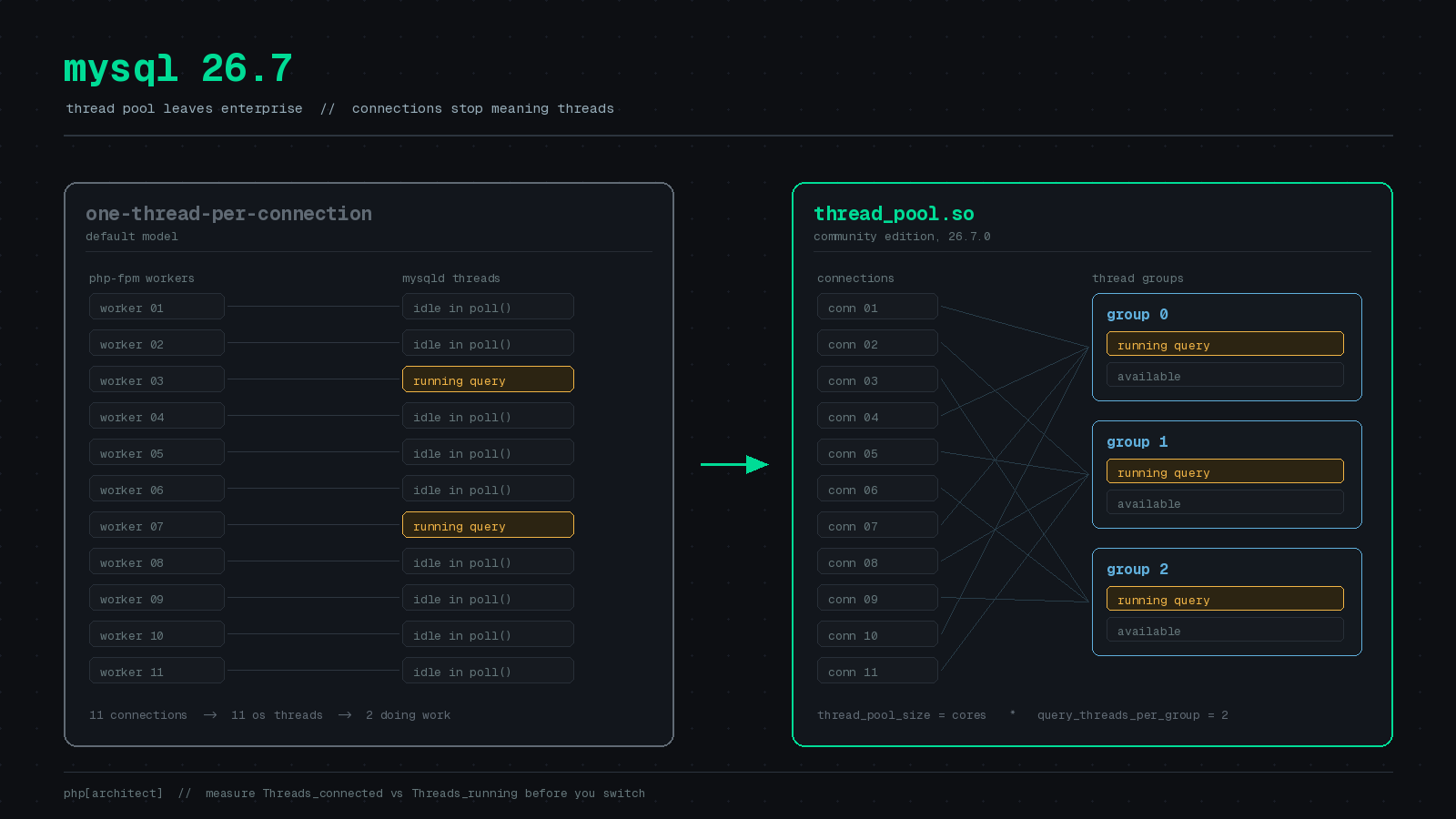
PHP’s process model has always been slightly rude to MySQL. Every PHP-FPM worker that touches the database opens its own connection, holds it for the life of the request, and does nothing with it for most of that time. A modest fleet of four app servers running pm.max_children = 60 produces 240 potential connections against a database that is realistically executing maybe a dozen queries at once. The rest are open sockets waiting on PHP to finish rendering Blade.
That has been fine, mostly, because MySQL’s default execution model is one operating system thread per connection and threads are cheap until they are not. The point at which they stop being cheap is the point at which someone on your team starts reading about ProxySQL.
There has been a third option for years, and as of MySQL 26.7.0 on July 28, 2026, you can actually use it. That release moved the Thread Pool plugin out of Enterprise Edition and into Community Edition (Oracle MySQL blog). The documentation section that used to be titled “MySQL Enterprise Thread Pool” is now just MySQL Thread Pool, which is the kind of quiet rename that tells you more than a press release. The cleanup is not finished, mind you: the 26.7 manual still links an FAQ page called “MySQL Enterprise Thread Pool.”
What the thread pool actually changes
Default MySQL: connection arrives, server spawns a thread, thread lives until the connection closes. Two hundred connections means two hundred threads, all scheduled by the kernel, all fighting for the same runqueue and the same cache lines even though most of them are parked in poll().
Thread pool: connections are distributed across a fixed number of thread groups, and each group has a small set of threads that actually execute statements. Connections become cheap bookkeeping; execution capacity stays bounded. The decoupling is the entire point.
If you have ever tuned pm.max_children you already understand the shape of the problem. The thread pool is the same idea applied on the other side of the socket.
Turning it on
It is a plugin, so it loads at startup and requires a restart:
[mysqld]
plugin-load-add        = thread_pool.so
thread_pool_size       = 16
thread_pool_algorithm  = 1
thread_pool_stall_limit = 10
Ronald Bradford ran the Early Access build in Docker and captured the startup banner, which is the fastest way to confirm you configured what you think you configured:
[System] [MY-013852] [Server] Thread pool plugin started successfully with parameters:
thread_pool_size = 1, thread_pool_algorithm = High Concurrency Algorithm,
thread_pool_stall_limit = 6, thread_pool_prio_kickup_timer = 1000,
thread_pool_max_unused_threads = 32, thread_pool_max_active_query_threads = 0,
thread_pool_dedicated_listeners = 0, thread_pool_max_transactions_limit = 32,
thread_pool_transaction_delay = 0, thread_pool_query_threads_per_group = 2,
thread_pool_connection_report_interval = 120, thread_pool_longrun_trx_limit = 2000
Querying information_schema.tables for performance_schema tables matching tp% turned up four, not the three the 9.7 Enterprise docs describe. The extra one is tp_connections. Worth poking at.
One oddity: in his SHOW PLUGINS output the license column for thread_pool.so still reads PROPRIETARY. The plugin ships in the Community Server build regardless, but if you have tooling that audits plugin licenses, expect it to complain.
The four knobs that matter
The tuning guide is unusually direct for MySQL documentation, so here is the short version for an InnoDB workload.
thread_pool_size is the number of thread groups. Set it to the number of physical cores, up to 512. It cannot be changed at runtime. The documented default is 16, which is wrong for most machines in one direction or the other.
thread_pool_query_threads_per_group should start at 2, and the docs say so outright: lower values usually offer no performance benefit. The manual describes the default as a single query thread, while Bradford’s 26.7 build reported 2 at startup, so set it explicitly rather than trusting either. Multiply it by thread_pool_size for a rough ceiling on threads available to run queries.
thread_pool_algorithm should be 1 for high concurrency. This one is a straight recommendation in the manual, not a judgement call.
thread_pool_stall_limit is the timeout, in units of 10ms, after which a statement is treated as stalled so the group can start something else. Default is 6, meaning 60ms, which the docs describe as suitable for servers running very simple statements. The maximum is 600, or six seconds. The manual’s worked example takes a workload where 99.9 percent of statements finish inside 100ms and sets the limit to 10 so the long tail gets classified as stalled. For a typical Laravel app, 10 is a sane starting point.
There is a fifth, thread_pool_max_transactions_limit, which caps concurrent transactions. The recommended starting value is physical cores times 32, adjusted down while watching throughput. Set this carelessly and you will build yourself a very effective outage.
Measuring before you touch anything
Do not enable this because it sounds good. Enable it because your connection count and your concurrency are wildly different numbers. That is a five minute check, and you can run it from PHP:
namespace App\Console\Commands;

use Illuminate\Console\Command;
use Illuminate\Support\Facades\DB;

final class ConnectionPressure extends Command
{
    protected $signature = 'db:connection-pressure';

    protected $description = 'Compare open connections against actual query concurrency.';

    public function handle(): int
    {
        $status = DB::select(
            "SHOW GLOBAL STATUS WHERE Variable_name IN
             ('Threads_connected','Threads_running','Max_used_connections')"
        );

        $stat = collect($status)->pluck('Value', 'Variable_name');
        $max  = (int) DB::selectOne("SHOW VARIABLES LIKE 'max_connections'")->Value;

        $connected = (int) $stat['Threads_connected'];
        $running   = (int) $stat['Threads_running'];

        $this->table(['Metric', 'Value'], [
            ['max_connections',      $max],
            ['Max_used_connections', $stat['Max_used_connections']],
            ['Threads_connected',    $connected],
            ['Threads_running',      $running],
            ['Idle ratio',           $connected > 0
                ? round(($connected - $running) / $connected * 100) . '%'
                : 'n/a'],
        ]);

        return self::SUCCESS;
    }
}
Sample it every few seconds during your busiest hour, not once at 3pm on a Tuesday. If Threads_connected sits at 180 while Threads_running hovers between 4 and 15, you are paying for 165 threads that exist only because PHP-FPM workers hold connections open. That gap is what the thread pool eats.
If the two numbers track each other closely, you have a query problem, not a connection problem, and a thread pool will not help you.
Note that DB::select uses the read connection by default, so on a read/write split you will be measuring a replica. Point it at the writer if that is what you are tuning.
Once it is running, the stall ratio is the number to watch, assuming tp_thread_group_stats is enabled:
SELECT SUM(STALLED_QUERIES_EXECUTED) / SUM(QUERIES_EXECUTED) AS stall_ratio
FROM performance_schema.tp_thread_group_stats;
Keep it low. Rising stall ratio means raise thread_pool_stall_limit.
Where this does not help
Persistent connections are the obvious pairing, and they are still a trap. PDO::ATTR_PERSISTENT hands the same connection back to the next request on that FPM worker, session state and all. Laravel does not expose it as a first-class config key, and for good reason. The thread pool makes a large number of idle connections survivable; it does not make connection reuse in PHP any less fiddly.
The thread pool also does nothing about max_connections. That limit still applies, and the 26.7 operation docs spell the arithmetic out: the maximum number of threads is max_connections plus thread_pool_size. If you are running out of connection slots, you need a proxy or fewer workers, not a different scheduler.
And the honest caveat: this is an Innovation release. MySQL 26.7 is production-grade per Oracle’s release model, but the LTS line is still 9.7, and the next Innovation release lands in October as 26.10.0. If your ops policy says LTS only, you are waiting for the thread pool to reach the next LTS branch.
The reason to care now is that a feature which used to require a support contract is sitting in the Community build, and the workload it was designed for is exactly the one PHP produces by default.
Sources: MySQL July 2026 GA Releases Now Available, Oracle MySQL Blog, MySQL 26.7 Reference Manual: MySQL Thread Pool, MySQL 26.7 Reference Manual: Thread Pool Tuning, Changes in MySQL 26.7.0, MySQL Release Notes, A first look at MySQL 26.7 Early Access, Ronald Bradford.