AlpineJS in 2026: $store, $persist, and $dispatch Patterns for PHP Developers
Master AlpineJS state management with $store, $persist, and $dispatch. Practical patterns for PHP, Laravel, and Livewire developers building reactive UIs.
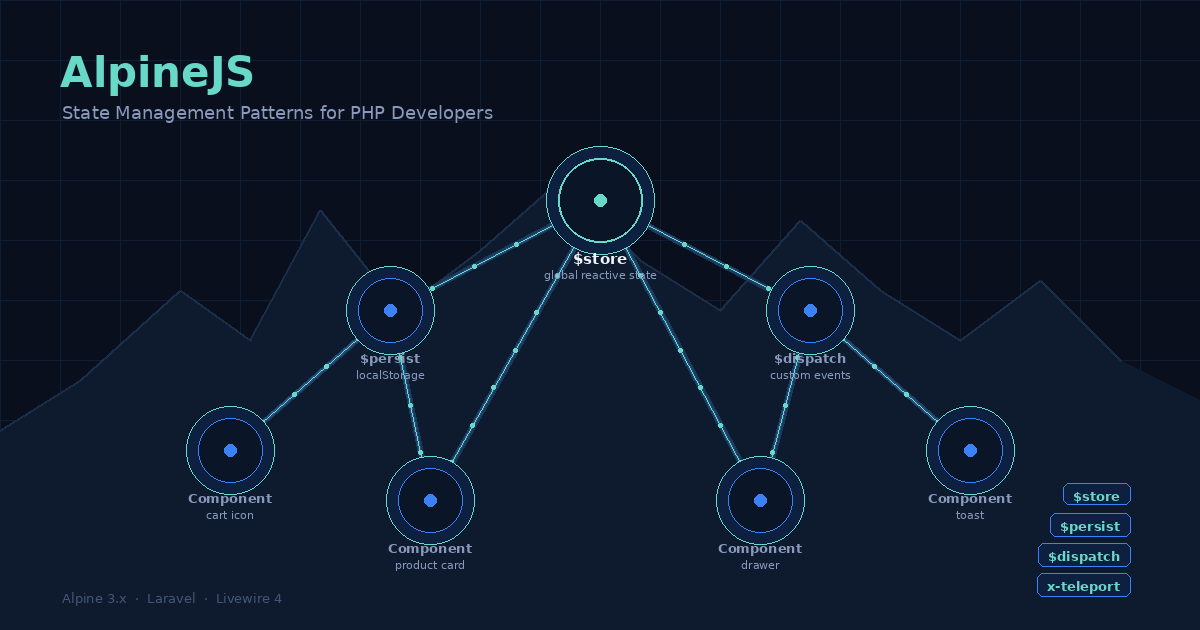
AlpineJS has settled into a comfortable role in the PHP ecosystem: it is the JavaScript layer you reach for when Livewire’s server round-trips are overkill and a full Vue or React component is more ceremony than the problem deserves. If you are building applications with Laravel, Symfony, or any PHP backend in 2026, there is a good chance Alpine is already in your stack. But most developers are using maybe thirty percent of what it offers.
The $store, $persist, and $dispatch magics — along with x-teleport — are the parts that elevate Alpine from a Stimulus alternative to a genuine reactive state management layer. Here is a practical look at each one, with patterns that translate directly to the kinds of problems PHP developers face day-to-day.
Why Alpine Remains Relevant
Before diving into patterns, it is worth being clear about where Alpine fits in 2026. Livewire 4 is excellent for server-driven interactivity. Symfony UX Live Components solve the same problem for Symfony shops. But both of those tools come with a network request cost — every user interaction that updates state makes a round-trip to your PHP server.
Alpine lives entirely in the browser. For interactions that do not need server data — toggling a sidebar, managing a multi-step form’s current step, persisting a user’s dark mode preference, coordinating a toast notification system — Alpine handles them without any network traffic. The combination of Livewire handling data and Alpine handling local UI state is not a compromise; it is the intended architecture, and Livewire 4’s wire:model and Alpine’s x-model are designed to coexist cleanly.
$store: Reactive Global State
The $store magic gives you a reactive data store that any Alpine component on the page can read and write. You define stores in your Alpine initialization block, and they behave exactly like component x-data — changes propagate reactively to everything that references them.
// In your main layout or app.js
document.addEventListener('alpine:init', () => {
    Alpine.store('cart', {
        items: [],
        open: false,

        get count() {
            return this.items.length;
        },

        add(product) {
            this.items.push(product);
            this.open = true;
        },

        remove(productId) {
            this.items = this.items.filter(i => i.id !== productId);
        }
    });
});
Now any component on the page can read or mutate the cart without passing props through layers of components:
<!-- Cart icon in the navbar -->
<button @click="$store.cart.open = !$store.cart.open" class="relative">
    <svg><!-- cart icon --></svg>
    <span
        x-show="$store.cart.count > 0"
        x-text="$store.cart.count"
        class="absolute -top-2 -right-2 bg-red-500 text-white rounded-full text-xs w-5 h-5 flex items-center justify-center"
    ></span>
</button>

<!-- Product card - completely separate component -->
<div x-data>
    <button @click="$store.cart.add({ id: {{ $product->id }}, name: '{{ $product->name }}', price: {{ $product->price }} })">
        Add to cart
    </button>
</div>

<!-- Cart drawer - also separate -->
<div x-show="$store.cart.open" x-cloak class="fixed inset-y-0 right-0 w-80 bg-white shadow-xl">
    <template x-for="item in $store.cart.items" :key="item.id">
        <div x-text="item.name"></div>
    </template>
</div>
The store acts as a single source of truth. Because it is reactive, every template expression that references $store.cart.count updates automatically when an item is added — no events, no prop drilling, no re-renders to coordinate manually.
For PHP applications, a natural pattern is to seed the store from server-rendered data. If the user has existing cart items from a session, you can pass them in at initialization:
<script>
document.addEventListener('alpine:init', () => {
    Alpine.store('cart', {
        items: @json($cartItems), // Blade/Twig injects existing items
        open: false,
        // ... methods
    });
});
</script>
$persist: Surviving Page Reloads
$persist is Alpine’s localStorage bridge. When you wrap a value in $persist(), Alpine automatically saves it to localStorage on every change and restores it on page load. The magic key is derived from the property name, with an optional prefix for namespacing.
<div x-data="{ darkMode: $persist(false), sidebarOpen: $persist(true) }">
    <button @click="darkMode = !darkMode">
        Toggle dark mode
    </button>
    <button @click="sidebarOpen = !sidebarOpen">
        Toggle sidebar
    </button>
</div>
After the first visit, these preferences survive page navigation, browser restarts, and full page reloads without any backend involvement. The value false is the default — if no localStorage entry exists yet, Alpine uses it; otherwise it restores whatever was saved.
One pattern that works particularly well for PHP developers building multi-page applications: persist UI state that would otherwise require a server round-trip or session storage. Tab selection, accordion state, pagination preferences, and column sort direction in data tables are all good candidates.
<!-- Data table with persisted sort preference -->
<div x-data="{
    sortColumn: $persist('created_at'),
    sortDirection: $persist('desc'),

    sort(column) {
        if (this.sortColumn === column) {
            this.sortDirection = this.sortDirection === 'asc' ? 'desc' : 'asc';
        } else {
            this.sortColumn = column;
            this.sortDirection = 'asc';
        }
        // Trigger a Livewire method or form submission with the new sort
        this.$dispatch('sort-changed', { column: this.sortColumn, direction: this.sortDirection });
    }
}">
$dispatch: Custom Events Between Components
$dispatch emits a custom browser event from the current element, which bubbles up the DOM. Any ancestor element — including a Livewire component — can listen for it. This is how Alpine components coordinate without being directly nested.
The pattern works both within Alpine (using @event-name) and across the Alpine/Livewire boundary (using @event-name.window or Livewire’s wire:on):
<!-- Deep in a product card component -->
<button @click="$dispatch('product-selected', { id: productId, name: productName })">
    Select
</button>

<!-- Livewire component wrapping the product grid -->
<div wire:on:product-selected="selectProduct($event.detail.id)">
    <!-- product grid renders here -->
</div>
For Alpine-to-Alpine communication across sibling components (where events do not naturally bubble to a shared ancestor), dispatch to window:
<!-- Notification trigger anywhere on the page -->
<button @click="$dispatch('notify', { message: 'Saved!', type: 'success' })">
    Save
</button>

<!-- Notification display component, listening globally -->
<div
    x-data="{ notifications: [] }"
    @notify.window="notifications.push($event.detail); setTimeout(() => notifications.shift(), 3000)"
>
    <template x-for="note in notifications" :key="note.message">
        <div x-text="note.message" :class="note.type === 'success' ? 'bg-green-500' : 'bg-red-500'" class="p-4 text-white rounded">
        </div>
    </template>
</div>
This toast notification pattern is common enough that it is worth putting in a reusable Blade component or Twig partial. The $dispatch stays in your component-specific templates; the listener lives in your layout.
x-teleport: Rendering Outside the Component Tree
x-teleport moves Alpine-managed content to a different part of the DOM while keeping it reactive to the originating component’s data. The most common use is modals: your modal trigger button is deep in a card or list item, but the modal itself needs to render at the <body> level to avoid z-index and overflow-hidden issues.
<!-- Product card - buried in a grid -->
<div x-data="{ showModal: false, product: @json($product) }">
    <button @click="showModal = true">Quick View</button>

    <template x-teleport="body">
        <div
            x-show="showModal"
            x-cloak
            @click.self="showModal = false"
            class="fixed inset-0 bg-black/50 flex items-center justify-center z-50"
        >
            <div class="bg-white rounded-lg p-6 max-w-md w-full">
                <h2 x-text="product.name"></h2>
                <p x-text="product.description"></p>
                <button @click="showModal = false">Close</button>
            </div>
        </div>
    </template>
</div>
The teleported content renders as a direct child of <body> in the DOM, but it still has full reactive access to showModal and product from the originating x-data. When showModal changes, both the button’s state and the modal update together.
Combining the Patterns
In a real PHP application, these pieces often work together. A typical admin interface might use $store for the notification queue and sidebar state, $persist for the user’s table preferences and dark mode setting, $dispatch to communicate from deeply nested Blade/Livewire components up to the layout-level notification handler, and x-teleport for any confirmation dialogs or complex overlays.
The result is a frontend that handles all local UI state without server round-trips, while Livewire or Symfony Live Components handle the data fetching and mutation that actually needs PHP. Alpine’s reactive system is lightweight enough that adding all of these patterns adds only a few kilobytes of JavaScript overhead — far less than any alternative framework that could solve the same problems.
If you have been using Alpine primarily for x-show, x-bind, and @click, spending an afternoon with $store and x-teleport will substantially change what you reach for when building the next interactive PHP interface.