One Command to Rule Them All: Laravel 13's New artisan dev
Laravel 13.16 ships a php artisan dev command that runs your server, queue, logs, and Vite together. Here is how to configure it in your app code.
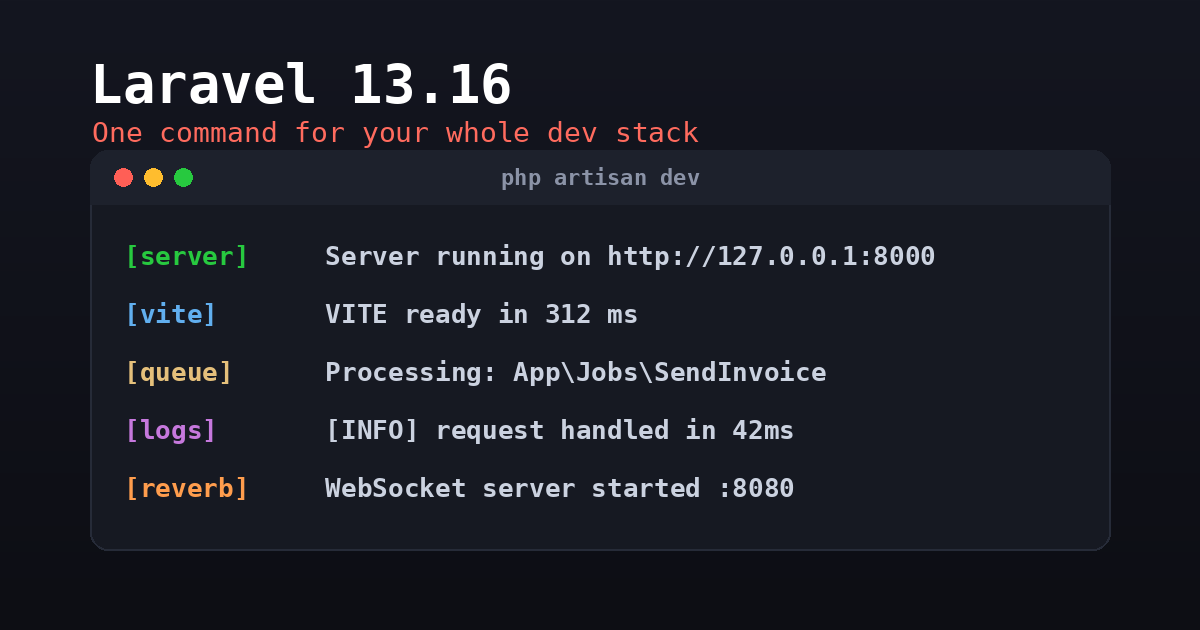
If you have built anything non-trivial with Laravel in the last couple of years, you know the dance. Open one terminal pane for php artisan serve, another for php artisan queue:listen, a third for php artisan pail to tail logs, and a fourth for npm run dev. The composer dev script that ships in the skeleton bundled those into one command using concurrently, which helped, but the configuration lived in composer.json as a tangle of shell strings that nobody enjoyed editing. Laravel 13.16 replaces that approach with a first-class php artisan dev command, and the configuration now lives in your application code where it belongs.
What Changed
Out of the box, php artisan dev does exactly what composer dev did: it boots the development server, a queue worker, the log tailer, and Vite, then runs them concurrently in a single terminal with multiplexed output. The behavior is the same. What moved is the where and the how. Instead of a JSON array of opaque command strings, you describe your development processes with a small fluent API exposed through the DevCommands class. That class is registered from a service provider, which means your dev process list is now versioned, readable PHP that you can comment, conditionally build, and refactor like any other code.
This matters more than it might sound. The composer.json approach made it awkward to add a project-specific process, because escaping a shell command inside a JSON string is miserable, and there was no good place to explain why a particular process existed. Moving it into a provider fixes both problems.
Registering Your Processes
The two methods you will use most are DevCommands::artisan() for Artisan commands and DevCommands::register() for arbitrary shell commands. A typical registration in a service provider’s boot() method looks like this:
use Illuminate\Foundation\Console\DevCommands;

public function boot(): void
{
    DevCommands::artisan('reverb:start');
    DevCommands::register('stripe listen --forward-to ' . config('app.url'));
}
The first line adds a Reverb WebSocket server to your dev stack. The second wires up the Stripe CLI to forward webhooks to your local app, with the URL pulled straight from config rather than hard-coded. Both processes now start and stop alongside everything else when you run php artisan dev, and both log into the same unified output stream.
By default, each process is named after the first segment before the first space in its command. You can override that with an optional second argument, which is handy when two processes would otherwise collide or when the auto-derived name is unhelpful:
DevCommands::artisan('queue:listen --tries=1', 'queue');
DevCommands::register('node scripts/watch.js', 'asset-watcher');
Color-Coding the Output
When four or five processes are interleaving their output in one pane, telling them apart at a glance is the difference between a usable terminal and a wall of noise. The fluent API lets you assign a color per process:
DevCommands::artisan('reverb:start', 'reverb')->orange();
DevCommands::register('stripe listen --forward-to ' . config('app.url'))->green();
Each process gets a colored label prefix, so your eye can lock onto the Reverb lines or the Stripe lines without reading every word. It is a small touch, but anyone who has stared at a busy dev terminal will appreciate it immediately.
Package Manager Detection
One genuinely clever addition shipped alongside the command: a NodePackageManager helper that inspects the lockfiles present in your project to figure out which JavaScript runner you actually use. If it finds a pnpm-lock.yaml, it resolves a generic asset command to pnpm. If it sees bun.lockb, it uses bun, and likewise for yarn and npm. This means the dev command does the right thing whether your team standardized on npm or migrated to pnpm or bun, without you hard-coding the runner into every registration. For shared starter kits and templates, that detection removes a whole category of “works on my machine” friction.
A Sensible Guardrail
There is one deliberate restriction worth understanding. DevCommands prevents packages in your vendor directory from registering dev processes automatically. That is the correct default. You do not want a freshly installed package silently spawning a background process every time you run php artisan dev, and you certainly do not want surprise long-running commands you never opted into. A package author can still expose a helper that you call from your own code to register its processes, so the capability exists, but the decision stays explicitly in your hands. This is a good example of Laravel choosing safe defaults while leaving an escape hatch for legitimate use.
One Upgrade Caveat
If you adopt this, go straight to v13.16.1 rather than v13.16.0. The initial release had a bug in how the artisan dev command itself was registered, and the point release fixes it. It is a one-line bump in your composer.json constraint, but skipping it will cost you a confusing few minutes wondering why the command is not behaving. This is the kind of thing worth noting before you start, not after.
The Rest of 13.16
The dev command was the headline, but the same release carried a few other quality-of-life wins. The InteractsWithData trait gained a whenFilledEnum() method that casts a request value to a backed enum and runs your callback only when the cast succeeds, replacing the old whenFilled() plus tryFrom() plus null-check shuffle. The withCookies() method moved from RedirectResponse up to the shared response trait, so you can attach a batch of cookies to a JSON or standard response in one call. And a new array maintenance mode driver joins the file and cache drivers, aimed squarely at parallel testing where mocking the Cache facade around artisan up and down used to cause trouble.
Worth Adopting
The artisan dev command is not a dramatic feature, but it is the kind of incremental polish that makes a framework pleasant to live in day after day. Moving your dev process list out of composer.json and into readable, colorable, config-aware PHP is strictly better than what came before, and the package manager detection quietly fixes a real cross-team annoyance. If you are already on Laravel 13, bump to 13.16.1 and spend ten minutes moving your processes into a DevCommands registration. Your terminal will thank you.