NativePHP Mobile v3: Building Your First Native Plugin
NativePHP Mobile v3 (Air) is free, MIT-licensed, and built on a modular plugin system. Here is how the plugin architecture works and how to build one.
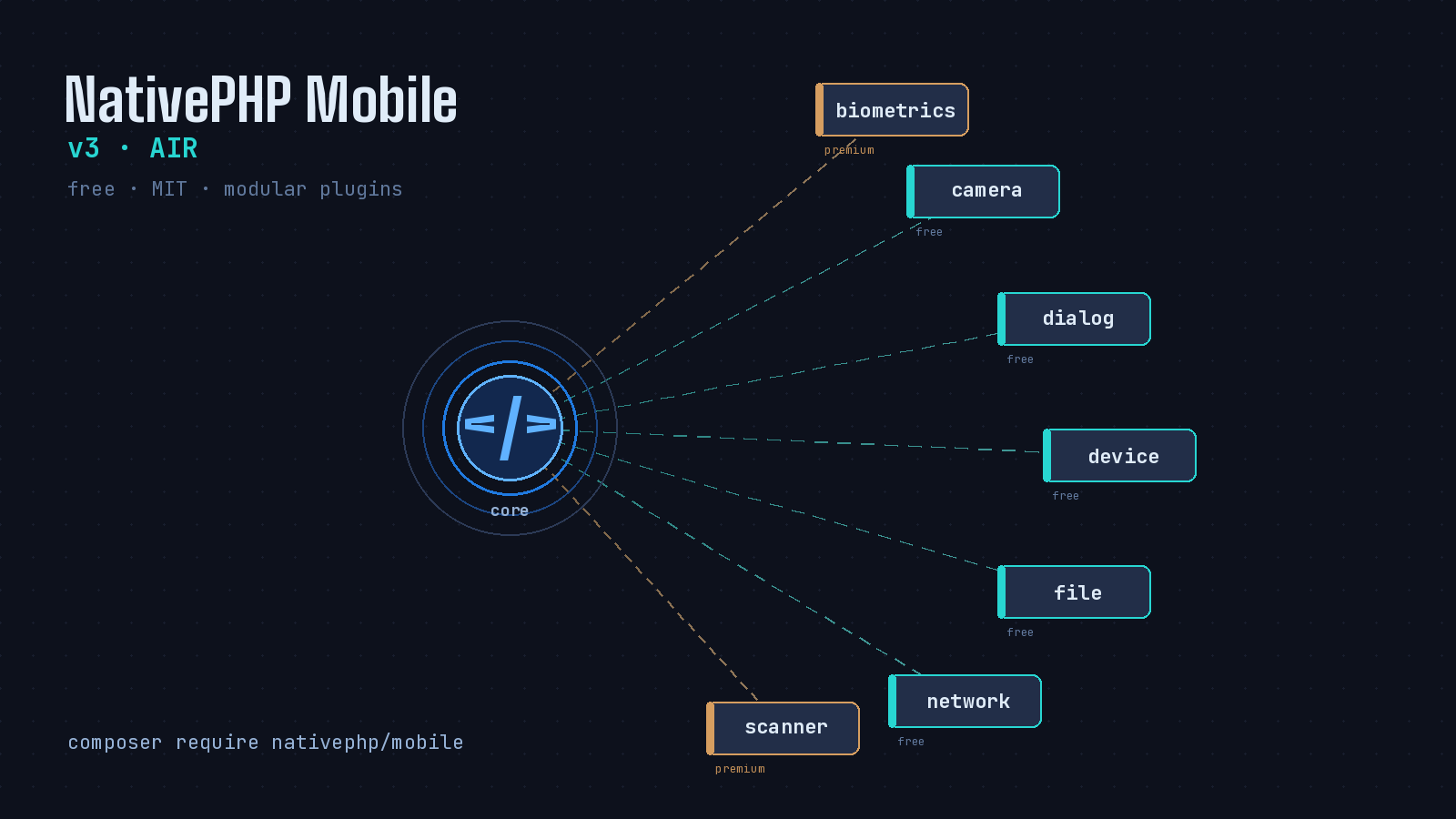
NativePHP for Mobile spent its first two major versions as a paid product with a monolithic core. As of v3, that has changed in two big ways. The framework is now free and MIT-licensed, and almost every piece of native functionality has been pulled out of the core and rebuilt as a modular plugin. The team calls this release “Air” because the new core is a minimal shell that only includes what your app actually uses. If you have been waiting to build iOS and Android apps with your existing Laravel skills, the barrier to entry just dropped to zero, and the most interesting part of the release is how the plugin system lets you reach into native code without rewriting your app in Swift or Kotlin.
What “Air” Actually Means
In v1 and v2, the core shipped with camera, biometrics, geolocation, dialogs, and everything else baked in. Your app carried all of it whether you used it or not, which made binaries larger and app store reviews more painful when reviewers asked why you requested permissions you never touched. v3 strips the core back to almost nothing. Each native capability is now a standalone Composer package containing its own Swift and Kotlin code, permission manifests, and native dependencies. You install only the plugins you need, and each one compiles directly into your app during the build.
The licensing split matters for planning. The framework core and the most popular plugins (Browser, Camera, Device, Dialog, File, Microphone, Network, Share, and System) are free and MIT-licensed. A handful of plugins moved to a paid one-time marketplace purchase: Biometrics, Geolocation, Push Notifications via Firebase, Scanner, and Secure Storage. The premium plugins are a single-seat license you keep forever and can use on unlimited projects, so this is not a per-app or subscription tax.
Getting started is now a four-line affair:
laravel new my-mobile-app
cd my-mobile-app
composer require nativephp/mobile
php artisan native:jump
That last command pairs with the free Jump app on your phone. You scan a QR code and your Laravel app loads on a real device against your local dev server, no Xcode or Android Studio compile required. Jump bundles every first-party plugin, including the premium ones, so you can evaluate the whole feature set before deciding what to buy.
Anatomy of a Plugin
A plugin is a Composer package with a couple of extra conventions. The composer.json declares a special type so NativePHP knows to look for native code:
{
    "name": "vendor/my-plugin",
    "type": "nativephp-plugin",
    "extra": {
        "laravel": {
            "providers": ["Vendor\\MyPlugin\\MyPluginServiceProvider"]
        },
        "nativephp": {
            "manifest": "nativephp.json"
        }
    }
}
The real work is described in a nativephp.json manifest. This is where you declare your bridge functions (the link between PHP and native code), any events the plugin dispatches, plus platform-specific permissions and dependencies. Here is a trimmed manifest for a plugin that needs the camera and pulls in Google’s ML Kit:
{
    "namespace": "MyPlugin",
    "bridge_functions": [
        {
            "name": "MyPlugin.DoSomething",
            "ios": "MyPluginFunctions.DoSomething",
            "android": "com.myvendor.plugins.myplugin.MyPluginFunctions.DoSomething"
        }
    ],
    "events": ["Vendor\\MyPlugin\\Events\\SomethingHappened"],
    "android": {
        "permissions": ["android.permission.CAMERA"],
        "dependencies": {
            "implementation": ["com.google.mlkit:barcode-scanning:17.2.0"]
        }
    },
    "ios": {
        "info_plist": {
            "NSCameraUsageDescription": "Camera is used for scanning"
        },
        "dependencies": {
            "pods": [{"name": "GoogleMLKit/BarcodeScanning", "version": "~> 4.0"}]
        }
    }
}
Notice that permissions and native dependencies travel with the plugin. When you install it, NativePHP wires the Android Gradle dependency, the iOS CocoaPod, and the relevant Info.plist and manifest entries automatically. You are not hand-editing AndroidManifest.xml or fighting with Podfile blocks.
Crossing the Bridge
A bridge function is the native side of the contract. On Android you write a small Kotlin object, declaring your own vendor-namespaced package so it does not collide with anything else:
// resources/android/src/MyPluginFunctions.kt
package com.myvendor.plugins.myplugin

import com.nativephp.mobile.bridge.BridgeFunction
import com.nativephp.mobile.bridge.BridgeResponse

object MyPluginFunctions {
    class DoSomething : BridgeFunction {
        override fun execute(parameters: Map<String, Any>): Map<String, Any> {
            return BridgeResponse.success(mapOf("status" to "done"))
        }
    }
}
The iOS side is the Swift equivalent. From the front end, plugins ship a small JavaScript stub so you can call native functions straight from Vue, React, or vanilla JS without thinking about the transport:
// resources/js/myPlugin.js
const baseUrl = '/_native/api/call';

async function bridgeCall(method, params = {}) {
    const response = await fetch(baseUrl, {
        method: 'POST',
        headers: { 'Content-Type': 'application/json' },
        body: JSON.stringify({ method, params })
    });
    return response.json();
}

export async function doSomething(options = {}) {
    return bridgeCall('MyPlugin.DoSomething', options);
}
Registering and Validating
Installing a plugin is not enough on its own. v3 requires you to explicitly register a plugin before it gets compiled into a build, which is a deliberate security measure so a transitive dependency cannot smuggle native code into your app. After a composer require, you run:
php artisan native:plugin:register vendor/plugin-nameThat adds the plugin’s service provider to the plugins() array in your published NativeServiceProvider. You can scaffold a brand new plugin with php artisan native:plugin:create, and crucially you can validate it before wasting a build cycle:
php artisan native:plugin:validateThis catches manifest errors, missing native code, and mismatched function declarations early. The June 5 release (v3.3.6) continued tightening this area along with iOS and Android fixes, so the tooling is actively maintained rather than a one-time drop.
Should You Reach For It
If you are a Laravel developer who has wanted into mobile but did not want to learn React Native or Flutter, the v3 changes make this the most credible entry point PHP has ever had. The free core removes the cost question, the plugin model keeps your binaries lean and your permission prompts honest, and Jump means you can be testing on a real phone in minutes. Writing the Kotlin and Swift is still the hard part, and the team knows it, which is why they sell a Plugin Development Kit for Claude Code and ship native:plugin:install-agent to drop specialized AI agents into your project. Even if you never write a line of native code yourself, the catalog of free and premium plugins covers most of what a typical app needs. For a lot of internal tools and side projects, that is more than enough to ship.