NativePHP v4's SuperNative: Real SwiftUI and Compose Screens From Blade
NativePHP for Mobile v4 introduces SuperNative, rendering native SwiftUI and Jetpack Compose screens from Blade with no web view involved.
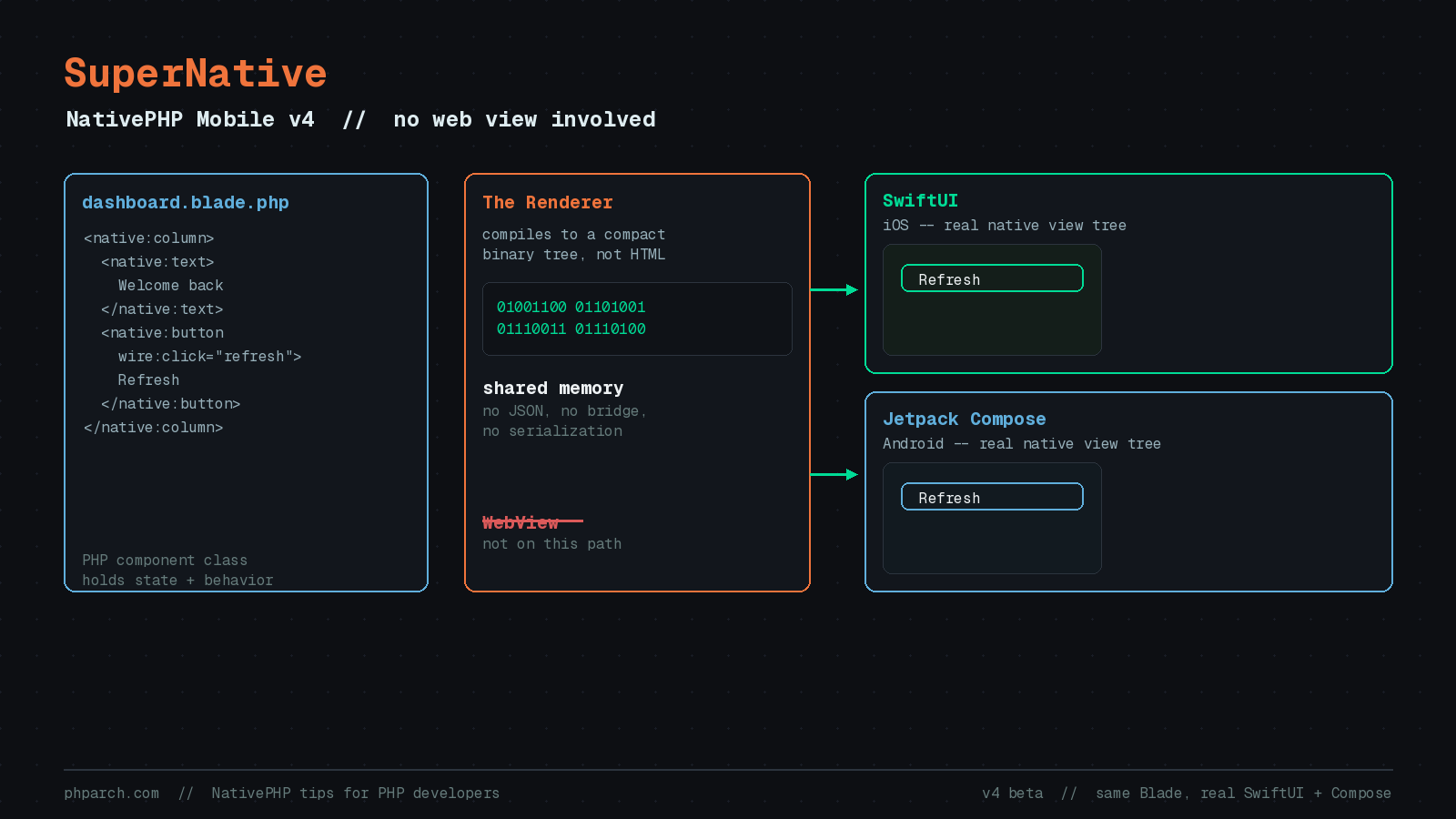
Every version of NativePHP for Mobile up to now has shared one quiet assumption: your screens are HTML, rendered inside a web view. Blade compiled to markup, a browser engine painted it, and the illusion of “native” held up because the surrounding shell (navigation, permissions, the app icon) really was native, even if the pixels on screen were not. NativePHP for Mobile v4, currently in beta, removes that assumption entirely with a new architecture called SuperNative.
What changes
SuperNative renders your screens as real SwiftUI views on iOS and real Jetpack Compose views on Android. Not a styled <div> pretending to be a button, an actual platform button, using the same rendering, animation, and accessibility code every other native app on the device uses. According to NativePHP’s own documentation, you still write Blade, and SuperNative is now the default: new v4 apps render native screens from the very first route with no configuration needed.
The team is explicit about what this is not. It is not a custom cross-platform renderer like Skia or Flutter’s Impeller, and it does not chase pixel-perfect parity between platforms. It embraces the differences between iOS and Android and gives you one consistent Blade syntax over both. It is also not a general-purpose PHP-to-native transpiler. NativePHP built its own Blade engine that compiles components into a compact binary representation instead of HTML, and that binary gets handed straight to the native shell, no bridge calls, no JSON round trip.
Why avoid the web view at all
Two motivations show up repeatedly in the docs. The first is performance: native views render and animate at full platform speed, with no web view startup cost and no DOM. The second is accessibility: SwiftUI and Jetpack Compose ship with the platform’s screen reader, dynamic type, and contrast support built in, rather than approximated through a browser.
The mechanism behind both is shared memory. NativePHP’s custom PHP build is embedded directly inside the native app process (the same embedding approach v3 already used for its persistent runtime), and the rendering layer talks to the native side through a shared memory buffer instead of serializing state to JSON and shipping it across a bridge. When a component re-renders, PHP writes a compact binary description of the screen straight into a buffer the native side already knows how to read. The docs describe the result as a state change in PHP reaching the screen in well under a frame.
Gestures get their own fast path too. Rather than routing every drag event and animation frame through PHP, SuperNative uses what it calls SharedValues: values that live on the native side and update on the UI thread at full frame rate. PHP holds a handle to the value and hears about the outcome, but the frame-by-frame work never crosses into PHP at all. That is how you get Reanimated-style, gesture-driven motion written entirely in Blade.
What building a screen looks like
If you have used Livewire, the mental model is familiar by design. Each screen is backed by a PHP component class that holds state and behavior, the same pattern as a Livewire component: user interaction calls a method, a property updates, and the screen re-renders to match. You compose the UI with EDGE components, a library of Blade tags (<native:button>, <native:list>, and dozens more covering things like bottom sheets, tab rows, and carousels) that compile down to SwiftUI and Compose rather than HTML.
Routing to a native screen uses a dedicated method on the router:
// routes/mobile.php
use App\Native\Screens\DashboardScreen;

Route::native('/dashboard', DashboardScreen::class);
Nothing about your Laravel backend changes to support this. Routes, controllers, Eloquent models, validation, and queues work exactly as they do today. SuperNative only concerns itself with the presentation layer.
The web view did not go away
If you have an existing NativePHP app, or you would rather keep building with HTML and CSS for now, the web view is still fully supported. It is just no longer the default; it is now something you explicitly add as a component inside a native screen. Reproducing the old, pre-v4 behavior is a few lines:
// routes/mobile.php
Route::native('/home', WebViewScreen::class);
{{-- webviewscreen.blade.php --}}
<webview php url="/" fullscreen />// routes/web.php
Route::view('/', 'welcome');Set NATIVEPHP_START_URL=/home in your .env and your app behaves the way NativePHP for Mobile versions before v4 did. This also means migration is a one-screen-at-a-time decision rather than a rewrite: you can adopt SuperNative for a settings screen or a dashboard while everything else stays exactly as it was, or not adopt it at all if your app is happy where it is.
Plugin authors are not left behind
One detail worth calling out for anyone maintaining a NativePHP plugin: SuperNative introduces no breaking changes to the plugin architecture, and it actually gives plugins more to work with. Instead of shipping a UI-less abstraction and hoping consumers wire up their own front end, a plugin can now ship a fully native EDGE component directly, and every developer using that plugin sees the same intended UI, consistently, on both platforms.
Trying it before you commit
NativePHP publishes a working demo, nativephp/super-native, that you can clone and run on a simulator or device today:
git clone https://github.com/nativephp/super-native
cd super-native
composer install
php artisan native:install
php artisan native:run
native:run builds the app and launches it on your connected device or simulator, and the source is a reasonable starting point for seeing how screens are actually assembled before you touch your own project.
Where this leaves things
SuperNative is still in beta as part of the v4 line, and the mobile package continues to bundle a custom PHP 8.4 build compiled specifically for iOS and Android, embedded into the native shell rather than run as a separate process. That part of the architecture, introduced with v3’s persistent runtime, is unchanged. What is new is that your UI no longer has to pass through a browser to get to the screen.
For a Laravel shop that has been quietly worried about the web view’s performance and accessibility limits, or that has been comparing NativePHP against React Native and Flutter on those exact points, this is the release that closes the gap. It is beta software, and the follow-up work (finishing out the remaining EDGE components, wider device testing) is ongoing, but the architecture itself is documented, runnable, and already the default for anyone starting a new NativePHP for Mobile v4 project.
Sources
- SuperNative Introduction — nativephp.com
- About the New Architecture — nativephp.com
- Overview, NativePHP for Mobile v4 (beta) docs — nativephp.com
- NativePHP v4 Release: Your NativePHP App Is Now 100% Native, No Web View Required — Developer Awam, Medium
- nativephp/super-native demo repository — github.com