MySQL 9.7 LTS: What PHP Developers Need to Know Before Upgrading
MySQL 9.7 LTS brings the Hypergraph Optimizer and JSON Duality View writes to Community Edition, plus a repo bug that quietly upgrades production servers.
Oracle shipped MySQL 9.7.0 on April 21, 2026, and it is not a routine point release. It is the first Long-Term Support version since MySQL 8.4, and it is the release where several features that used to sit behind an Enterprise Edition license moved into Community Edition. If you run MySQL under a Laravel or Symfony app and have been putting off reading a MySQL changelog, this is the one worth your time.
Innovation releases vs. LTS, briefly
MySQL has shipped two release tracks for a few years now. Innovation releases land roughly quarterly and carry new features but a short support window. LTS releases are the ones meant for production: according to Oracle’s documentation, an LTS series follows the Oracle Lifetime Support policy, which works out to five years of Premier Support and three years of Extended Support. MySQL 8.4 was the last LTS before this one, so 9.7 is the first real successor most production teams will plan an upgrade around.
Community Edition gets features that used to cost money
The headline change in 9.7 is what moved out of Enterprise Edition. According to the official release notes, four components that were previously Enterprise-only are now in Community Edition: the Replication Applier Metrics component, the Group Replication Flow Control Statistics component, the Group Replication Resource Manager component, and the Group Replication Primary Election component. The Telemetry component made the same move. None of these change how your PHP code talks to the database, but if you or your ops team run Group Replication or care about replication lag visibility, they are a real upgrade in what Community Edition can tell you without a support contract.
JSON Duality Views got a similar upgrade. These views let you expose a relational join as a single JSON document while still storing the data in normal tables. Previously, Community Server could define and read Duality Views, but writing to them required Enterprise. As of 9.7, Community Server supports full DML on Duality Views, meaning INSERT, UPDATE, and DELETE now work directly against the view, along with auto-increment support for generated keys. A simple example:
CREATE JSON DUALITY VIEW customer_orders_dv AS
SELECT JSON_DUALITY_OBJECT(
  '_id'      : c.customer_id,
  'name'     : c.full_name,
  'orders'   : (
    SELECT JSON_ARRAYAGG(
      JSON_DUALITY_OBJECT(
        '_id'    : o.order_id,
        'total'  : o.total_amount,
        'status' : o.status
      )
    )
    FROM sales_order o
    WHERE o.customer_id = c.customer_id
  )
)
FROM customer c;

UPDATE customer_orders_dv
SET data = JSON_SET(data, '$.orders[0].status', 'SHIPPED')
WHERE JSON_EXTRACT(data, '$._id') = 4821;
If your application maintains a hand-rolled layer for flattening relational data into API responses, this is worth a look before you write more of that code yourself.
The Hypergraph Optimizer is now free
The bigger story for anyone chasing slow queries is that the Hypergraph Optimizer, previously gated to Enterprise Edition, is now available in Community Edition. It is not the default, you have to turn it on, but it can now be turned on without a license.
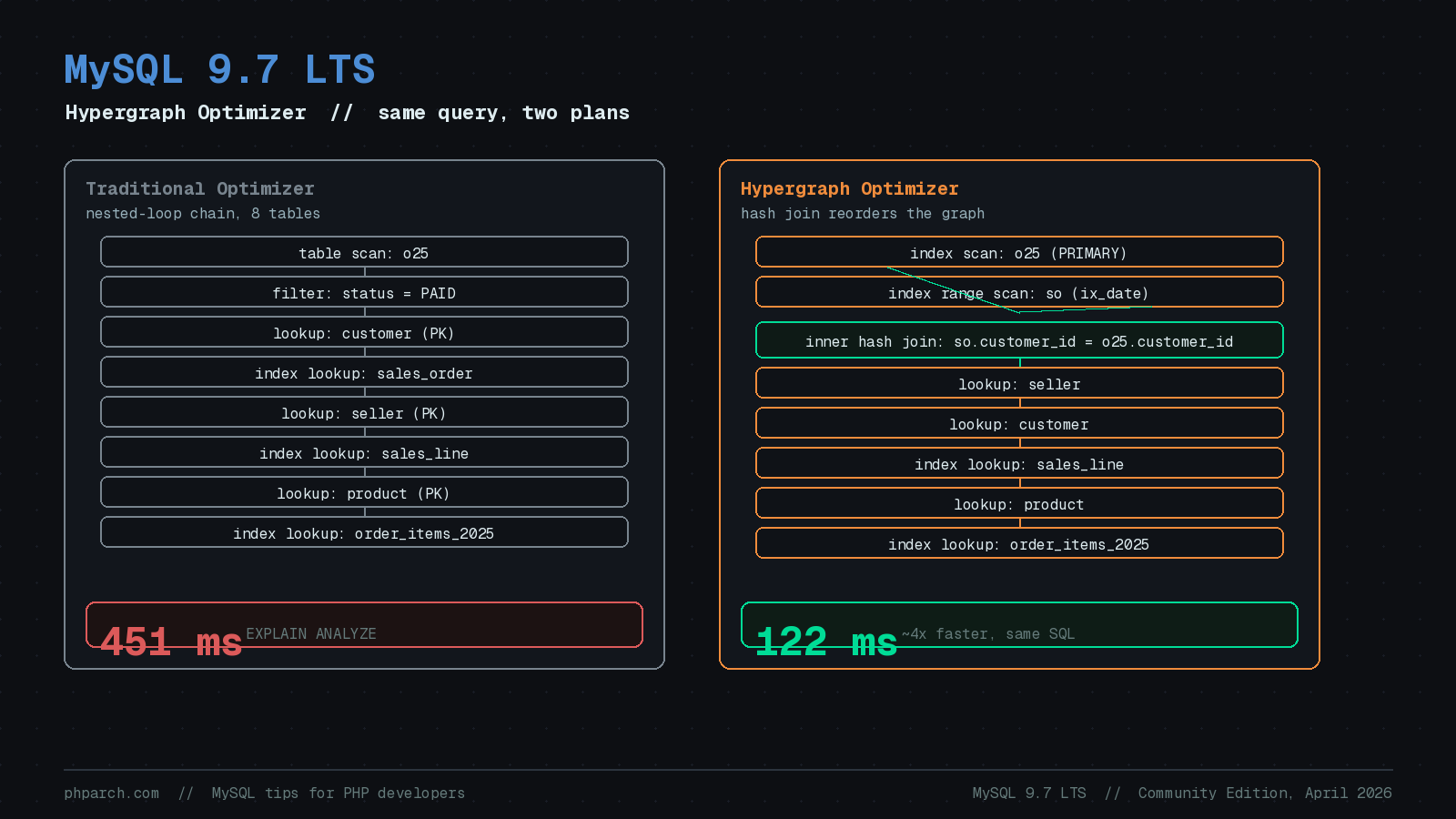
The traditional MySQL optimizer picks join order using cost-based heuristics that narrow the search space early, which works well for most queries but can miss better plans on complex joins. The Hypergraph Optimizer models the query as a graph of table relationships and explores a much wider set of join orders before settling on a plan. Oracle’s own MySQL Developer Advocate, Scott Stroz, published a walkthrough in July 2026 using an eight-table reporting query joining current and archived sales data. Run with the traditional optimizer, the query took about 451 ms. With Hypergraph enabled via an inline hint and nothing else changed, the same query took about 122 ms, a roughly 4x improvement, driven by Hypergraph choosing an early hash join instead of a long nested-loop chain.
You can turn Hypergraph on at whatever scope makes sense for testing:
-- single statement, safest way to test
SELECT /*+ SET_VAR(optimizer_switch='hypergraph_optimizer=on') */
  COUNT(*) FROM sales_order so JOIN sales_line sl ON sl.order_id = so.order_id;

-- current session only
SET SESSION optimizer_switch='hypergraph_optimizer=on';

-- every new connection, once you trust it
SET GLOBAL optimizer_switch='hypergraph_optimizer=on';

-- persisted across restarts
SET PERSIST optimizer_switch='hypergraph_optimizer=on';
The important caveat, straight from Oracle’s own writeup: this is not a universal speedup. Percona founder Peter Zaitsev put it plainly on LinkedIn, warning that Hypergraph makes many queries faster but not all of them, and that “newer” does not automatically mean “better” for your specific workload. Test with EXPLAIN ANALYZE FORMAT=JSON on your actual queries and real data volumes before flipping it on globally. If your Laravel app has a handful of reporting queries with five or more joins that have always felt slower than they should, those are the ones worth testing with the inline hint first.
// quick test from Artisan Tinker or a one-off script
DB::statement("SET SESSION optimizer_switch='hypergraph_optimizer=on'");
$start = microtime(true);
$rows = DB::select('EXPLAIN ANALYZE FORMAT=JSON ' . $rawReportQuery);
echo microtime(true) - $start;
The upgrade gotcha: watch your repo config
Here is the part that matters most if you manage your own MySQL servers rather than using a managed service. Shortly after 9.7 went GA, a packaging bug in mysql-community.repo (tracked as MySQL Bug #120315) silently disabled the pinned 8.4 LTS repository and enabled 9.7 LTS instead. Teams that had deliberately pinned themselves to 8.4 found that a routine dnf update or apt upgrade jumped their servers to a new major version without anyone asking for it. That is not a minor annoyance on a production database. Before you run your next routine package update on a MySQL host, check which repo file is actually enabled:
yum repolist enabled | grep mysql
# or
cat /etc/yum.repos.d/mysql-community.repo | grep -A1 '\[mysql'
And before an intentional upgrade, run MySQL Shell’s built-in upgrade checker rather than guessing:
mysqlsh -- util check-for-server-upgradeShould you actually upgrade?
MySQL 9.7 arrives alongside real community anxiety about Oracle’s long-term investment in MySQL. Percona published an open letter to Oracle earlier this year questioning the pace of development, and a community fork effort called VillageSQL has started tracking the project independently. Oracle has responded publicly about wanting tighter community feedback loops, and moving those Enterprise features into Community Edition is part of that response, whatever you make of the timing.
None of that changes the practical answer for most PHP shops: 9.7 is the current LTS, MySQL 8.4 has a finite clock on it, and the two headline additions, Community Edition Hypergraph and writable JSON Duality Views, are both things you can turn on selectively and roll back from if they do not help. Laravel’s and Symfony’s database layers talk to MySQL through PDO or mysqli and do not care which optimizer picked your join order, so neither framework needs any code changes to benefit. Start with an inventory of what you are running today, pick a non-critical replica to test the Hypergraph Optimizer against your slowest reporting queries, and confirm your package manager is pointed at the repo you think it is before you upgrade anything in production.
Sources
- MySQL 9.7 LTS Is Here: Upgrade and Modernize on a Stronger Community Edition — Oracle MySQL Blog
- MySQL 9.7: First Major LTS Since 8.4 Brings Enterprise Features to Community Edition — InfoQ
- MySQL 9.7 Community Edition: Smarter Join Planning with the Hypergraph Optimizer — Oracle MySQL Blog
- MySQL :: MySQL 9.7 Release Notes :: Changes in MySQL 9.7.0 (2026-04-21)
- No More JSON Plumbing: MySQL 9.7 Community Levels Up Duality Views — Oracle MySQL Blog
- MySQL Shell Upgrade Checker Utility Documentation
- An Open Letter to Oracle: Let’s Talk About MySQL’s Future — Percona Blog
- New Era of MySQL Community Engagement — Oracle MySQL Blog