Laravel LSP: First-Party Editor Intelligence Finally Comes to Neovim
Laravel LSP brings route, config, and Blade autocomplete to any editor that speaks LSP. Here is how to install it and wire it into Neovim.
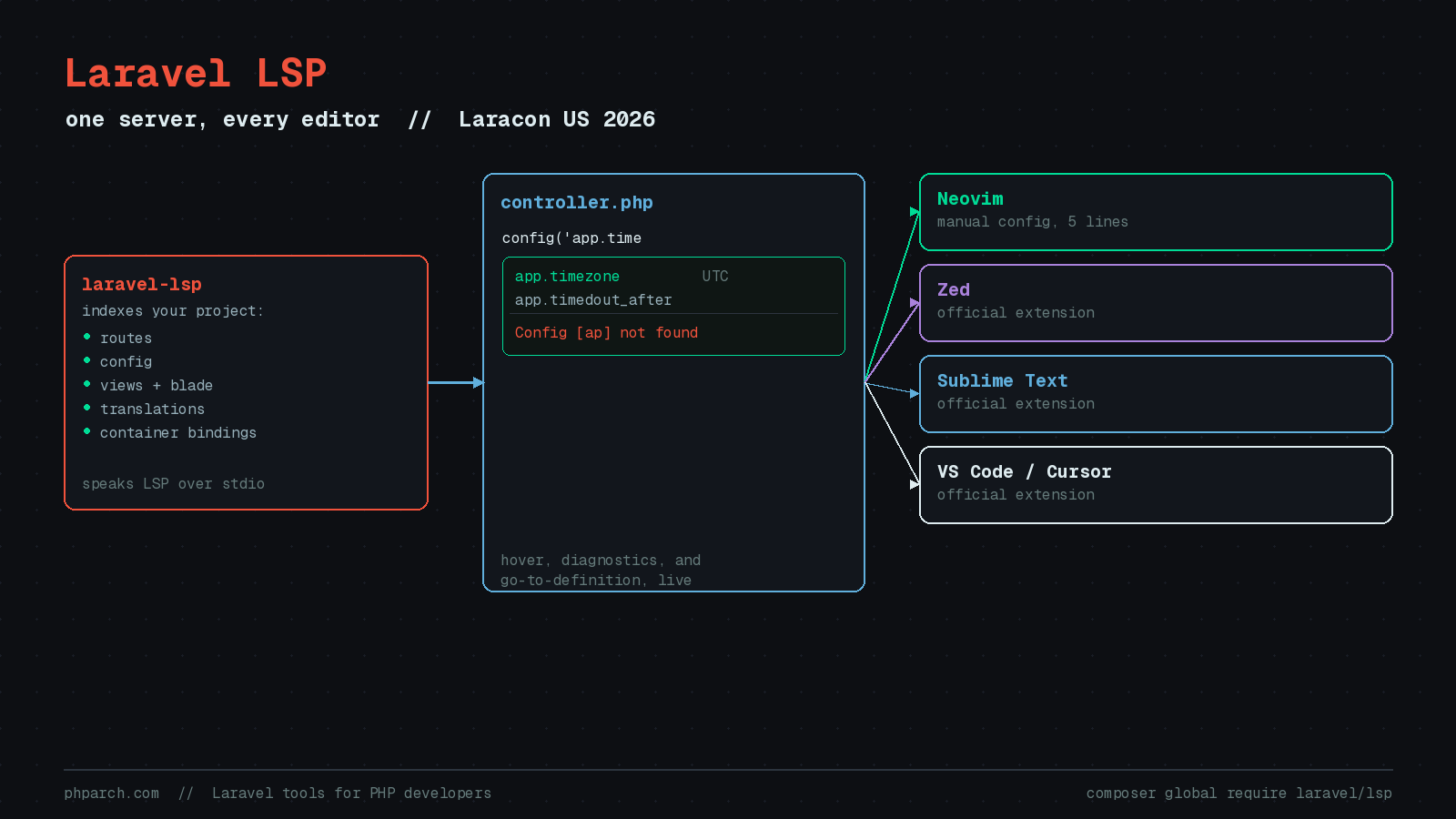
If you write Laravel in Neovim, you have spent years explaining to newcomers why route('orders.show') does not autocomplete the way it does for their coworker on VS Code. That gap closed on July 28, 2026, when Taylor Otwell walked on stage at Laracon US in Boston and announced Laravel LSP, a first-party language server that gives every LSP-capable editor the same Laravel-aware intelligence the official VS Code extension has had for years.
Why this needed to exist
Laravel’s VS Code extension already knew how to autocomplete config keys, jump to a view from view('orders.index'), and flag a typo in a route name before you ran the request. That logic lived entirely inside one extension, for one editor. If you worked in Neovim, Zed, or Sublime Text, you were stuck with community plugins that reverse-engineered pieces of the same behavior with varying degrees of accuracy and upkeep.
Laravel LSP moves that intelligence into a standalone server that speaks the Language Server Protocol over stdio. Any editor with an LSP client, which by 2026 is effectively all of them, can point at the same server and get the same answers. Sublime Text, Zed, and VS Code ship official Laravel extensions that wire it up automatically. Cursor rides along on the VS Code extension. Neovim and OpenCode need a few lines of manual configuration, which is a fair trade for framework-aware completion that used to require a whole separate package.
What it actually knows about your app
The server indexes your project on start and answers editor requests against that index, not a generic PHP parse. Per the feature table in the project’s README, coverage spans most of the string-keyed surface area of a Laravel app:
| Area | Capabilities |
|---|---|
| Routes | Completions, hovers, diagnostics, document links |
| Views and Blade | Completions, hovers, diagnostics, links, fixes |
| Translations | Key, locale, and parameter completions; hovers |
| Config | Key completions, hovers, diagnostics, links |
| Environment variables | Completions, hovers, diagnostics, links, fixes |
| Middleware | Completions, hovers, links |
| Inertia | Page and property completions, links, diagnostics |
| Livewire components | Completions, hovers, links |
| Auth and policies | Completions, hovers, diagnostics, links |
| Container bindings | Completions, hovers, diagnostics, links |
| Validation rules | Completions |
| Controller actions | Completions, diagnostics, links |
| Eloquent | Completions |
In the Laracon demo, typing config('app.time inside a controller produced a completion list of matching keys with their resolved values shown next to them, app.timezone next to UTC. Typing an incomplete or wrong key surfaces as a real diagnostic, something like “Config [ap] not found,” rather than a silent miss you only discover at runtime. Document links are what make view('orders.index') and route('orders.show') clickable in your editor, and the same indexed data backs go-to-definition, which is on by default.
Installing it
Laravel LSP ships as a global Composer package with prebuilt binaries, so there is no PHP process bootstrapping your own app just to run the server itself:
composer global require laravel/lspMake sure Composer’s global vendor bin directory is on your PATH, or the laravel-lsp binary will not resolve. The package needs PHP 8.2 or newer on the machine running the server, and ships prebuilt binaries for macOS (arm64 and x64), Linux (arm64 and x64), and Windows (x64).
Wiring it into Neovim
For Neovim 0.11 or newer, the built-in vim.lsp.config API is enough, no plugin manager entry required:
vim.lsp.config("laravel_lsp", {
  cmd = { "laravel-lsp" },
  filetypes = { "php", "blade" },
  root_markers = { "artisan", "composer.json", ".git" },
})

vim.lsp.enable("laravel_lsp")
Drop that into your LSP setup file, restart Neovim inside a Laravel project, and :LspInfo should show laravel_lsp attached to your PHP and Blade buffers. If you are on OpenCode instead, the equivalent is a block in opencode.json:
{
  "$schema": "https://opencode.ai/config.json",
  "lsp": {
    "laravel-lsp": {
      "command": ["laravel-lsp"],
      "extensions": [".php", ".blade.php"]
    }
  }
}
Telling it which PHP to run
The server executes scripts against your actual project to build its index, so it needs a working PHP command for that specific app, not just whatever PHP happens to be on your system PATH. That is controlled by a phpEnvironment option passed through the LSP initializationOptions object. Left at its default of auto, the server tries Herd, Valet, Sail, Lando, and DDEV in turn before falling back to a local PHP binary. You can pin it to one of those explicitly, or bypass detection entirely with a literal command array, which is the more reliable option if your team runs a mix of setups:
vim.lsp.config("laravel_lsp", {
  cmd = { "laravel-lsp" },
  filetypes = { "php", "blade" },
  root_markers = { "artisan", "composer.json", ".git" },
  init_options = {
    phpCommand = { "./vendor/bin/sail", "php" },
  },
})
Every capability in that feature table is individually toggleable through the same initializationOptions object, one boolean per feature, so you can turn off routeDiagnostics while keeping route completions if the diagnostics get noisy on a large route file. Pest users get two extra options worth knowing about: pestGenerateDocBlocks keeps generated Pest helper docblocks in sync as tests and autoload files change, and pestHelperFilePath controls where that generated file lives.
Worth knowing before you rely on it
The most recent tagged release at the time of writing is v0.0.29, published July 29, 2026, the day after the announcement. A version number that starts with 0.0 is the project’s own way of telling you that configuration option names, defaults, and even the initialization payload shape can still move before a 1.0 tag lands. If a config key in this post stops working in six months, check the README on the laravel/lsp GitHub repository before assuming your setup is broken.
It is also worth pairing this with artisan doctor, another first-party tool announced at the same keynote. Doctor runs health checks against your app (is APP_KEY set, does your PHP version match what Composer expects, are required extensions installed) and fixes what it can automatically. Laravel’s own announcement post specifically frames it as “a natural last step for AI coding agents,” running as a sanity check after an agent finishes a change. If you are running Claude Code or another coding agent against a Laravel codebase, LSP gives the agent’s editor integration the same framework awareness you get, and Doctor gives it a way to check its own work before calling a task done.
For anyone who picked Neovim over an IDE specifically for speed and has quietly tolerated worse Laravel support as the cost of that choice, this is the fix. It is not a plugin you install and hope stays maintained. It is the same server the Laravel team ships inside its own VS Code extension, just handed to you directly.