Symfony Finally Has an Official LSP, and It Boots Your Kernel
Symfony Language Tools is the official Symfony language server. It boots your app to read the real container, and it runs in Neovim, Zed and VS Code.
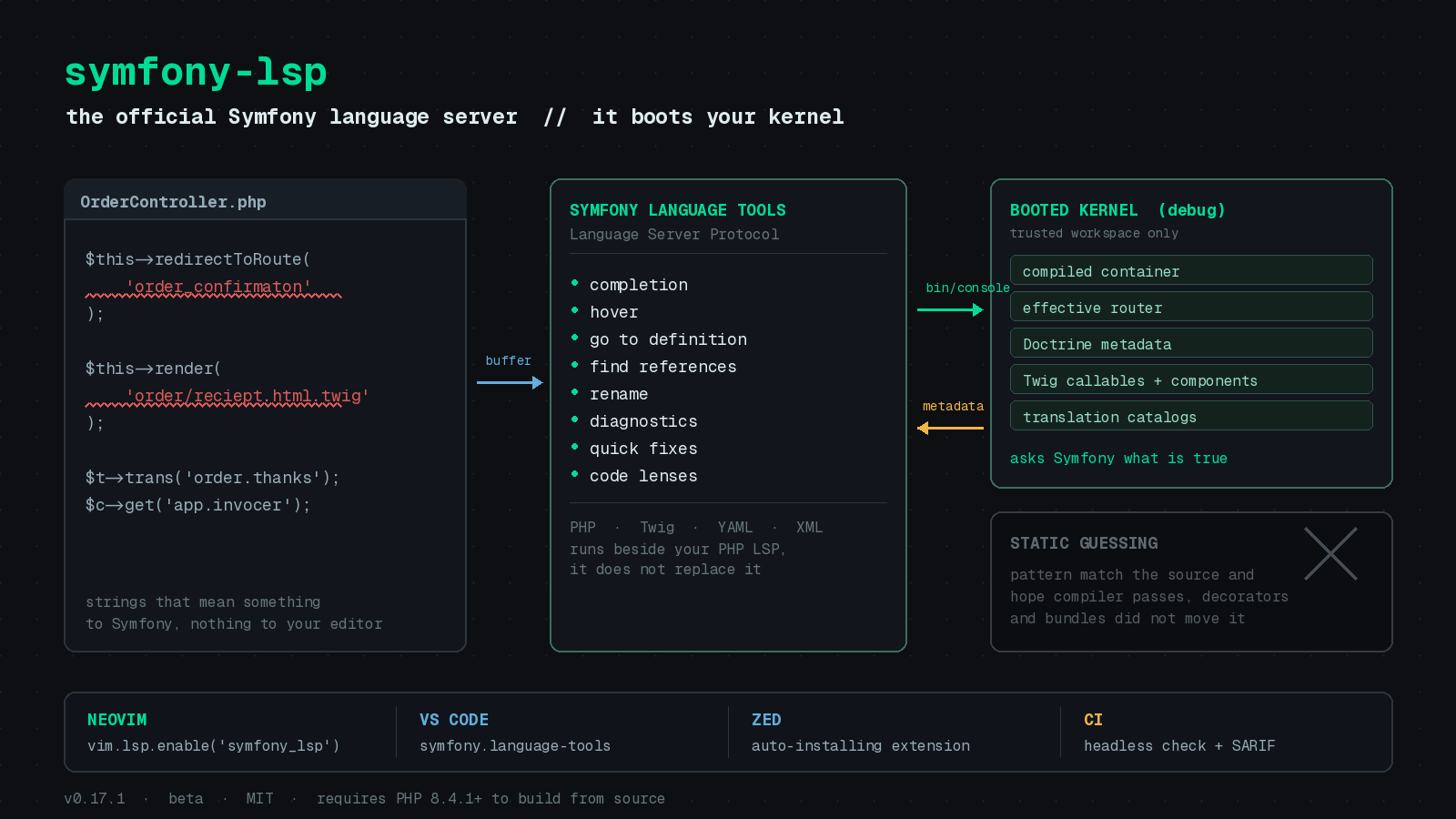
A Symfony application is mostly strings that secretly mean something. Route names. Service ids. Template paths. Translation keys. Environment variable names. Your editor sees redirectToRoute('order_confirmaton') and shrugs, because as far as it knows that is just a string, and strings are allowed to be anything.
PhpStorm users have had an answer for over a decade in the community Symfony Plugin. Everyone else has been guessing. If you live in Neovim, the state of the art was ripgrep and muscle memory.
On August 17, 2026, Fabien Potencier announced Symfony Language Tools, the official Symfony language server. It speaks plain LSP, it ships an MIT license, and it works in Neovim on day one.
It does not guess
The part worth paying attention to is the design decision underneath it.
Most framework tooling is static. It parses your source, pattern matches on things that look like route attributes or service definitions, and builds an approximation. That approximation is wrong exactly where your application gets interesting: compiler passes, decorated services, bundle-provided routes, config that gets normalized on the way in.
Symfony Language Tools takes the other road. In a trusted workspace it boots your kernel in debug mode and reads the compiled container, the effective router and the rest of the runtime metadata. It is asking Symfony what is true rather than inferring it from your files.
The follow-on decision is the one I like more. Diagnostics only appear when the server can prove a value is invalid. Fabien’s reasoning in the announcement is that false positives are the fastest way to get a tool disabled, so the server would rather say nothing. Two weeks of releases show that principle being enforced: PHP and Twig comments, verbatim blocks, dynamic Stimulus expressions, unpacked translation parameter maps and files owned by your dependencies are all ignored rather than guessed at.
Wiring it into Neovim
There is no first-party plugin anymore. Version 0.8.3 replaced it with an nvim-lspconfig integration, which is the right call. Install the server, then turn it on:
:MasonInstall symfony-lspvim.lsp.enable('symfony_lsp')That is the whole happy path. If your nvim-lspconfig is older than the symfony_lsp entry, copy editor/neovim/lsp/symfony_lsp.lua out of the repository into lsp/symfony_lsp.lua in your config directory. If Mason does not have the package yet, grab a standalone archive from GitHub Releases and put symfony-lsp on your PATH.
The server attaches to PHP, Twig, YAML, JSON, XML, JavaScript, TypeScript and dotenv buffers under a composer.json or Git workspace. Keep Intelephense or your PHP language server of choice running alongside it. This one does Symfony, not PHP.
Workspace trust is not a formality
Since runtime indexing executes your application, the server asks before it does that. The prompt is per language server process. For a config you already scope to a project, declare it up front:
vim.lsp.config('symfony_lsp', {
    init_options = {
        workspaceTrust = true,
    },
})

vim.lsp.enable('symfony_lsp')
Set workspaceTrust = false to pin a project to static-only mode. The docs suggest keeping this decision in a project-local .nvim.lua through Neovim’s trusted local config support rather than granting it globally, which is worth doing. “My editor runs bin/console in this repo” is a reasonable thing to opt into deliberately and an unreasonable thing to have on everywhere.
Configuration lives in init_options and settings.symfonyLsp:
vim.lsp.config('symfony_lsp', {
    init_options = {
        phpCommand = { 'symfony', 'php' },
        environment = 'dev',
        debug = true,
        runtimeIndexing = true,
    },
    cmd_env = { SYMFONY_LSP_MEMORY_LIMIT = '4G' },
})
phpCommand is an argument list, which is what makes the next trick possible.
Your PHP can stay in Docker
If your PHP only exists inside a container, runtime indexing used to be off the table. Version 0.10.0 added containerProjectRoot to fix that. Point the server at your container’s PHP and tell it where the project lives inside:
{
    "symfonyLsp.phpCommand": [
        "docker", "compose", "exec", "-T", "php", "php"
    ],
    "symfonyLsp.containerProjectRoot": "/app"
}
The kernel boots inside the container while Go to Definition still opens files on your host. The same mechanism covers a VM or any other isolated PHP command.
Two weeks, seventeen releases
The pace since launch has been aggressive, and the 0.16 recap is a good snapshot of what changed. Custom Twig functions and filters now connect to their PHP implementations, with hover showing the signature and named argument completion that reports unknown names. Twig’s types tag is understood:
{% types {
    ## The product displayed on this page.
    product: 'App\\Entity\\Product',
    featured?: 'boolean',
} %}
Service definitions declared in XML are indexed for navigation, references and rename across XML, YAML and PHP, though completion in XML is not there yet. Doctrine metadata now comes from the runtime, so XML and YAML mappings and vendor entities resolve, not just attributes. asset() falls back to files under public/ for Webpack Encore projects that never adopted AssetMapper.
Release 0.17.0 on August 28 pushed into CI territory with a headless diagnostics check that produces reports and baselines, plus SARIF output for code-scanning integrations. A language server that can also fail a build over a typo’d translation key is a different tool than a language server.
They test it against real applications
The first version was validated against the Symfony applications behind symfony.com. That test matrix is now public and runs against pinned revisions of Kimai, Mautic, Sulu Demo, Sylius, Shopware and Symfony Demo, covering Symfony 6.4, 7.4 and 8.1. Each run indexes cold and warm, boots the app and issues real completion, hover, navigation, reference, code action and rename requests.
That is why the changelog reads the way it does. Real applications produced support for XML service definitions, INI translation catalogs, Doctrine XML and YAML mappings, themed Twig loaders, kernels outside the App namespace and legacy app/AppKernel.php layouts. Fixtures do not surface any of that.
Worth noting for those of us following how AI is landing in serious open source: Fabien says most of the code was written and reviewed by AI models, mainly Claude Fable 5 and GPT-5.6 Sol, with architecture, scope and final approval staying with him. The project carries an extensive test suite, performance benchmarks and the dogfooding matrix above, which is the part that makes the claim credible.
Before you install it
It is a beta and the announcement says so plainly. Source installs need PHP 8.4.1 or later, and runtime indexing needs your Composer dependencies installed plus a PHP command compatible with your Symfony version. Supported branches follow Symfony’s release metadata, so 6.4, 7.4 and 8.x. The macOS binaries are not signed or notarized, which means an xattr -dr com.apple.quarantine after you verify the checksum. Server memory defaults to a 2 GB ceiling.
If you have been maintaining a Symfony application from a terminal editor and quietly envying the PhpStorm crowd, this is the thing you have been waiting for. Install it, open your gnarliest legacy app, and file an issue wherever it gets confused. That is what a beta is for.
Sources: Announcing Symfony Language Tools, Symfony Language Tools: A Busy First Week, symfony/language-tools README, Neovim guide, standalone server guide, CHANGELOG.