PIE 1.5 Breaks Unattended Extension Installs: Fix Your CI with --select
PIE 1.5 ignores the old auto-select flag, so unattended project installs now fail until you name each package. Here is how to fix CI, Docker, and deploys.
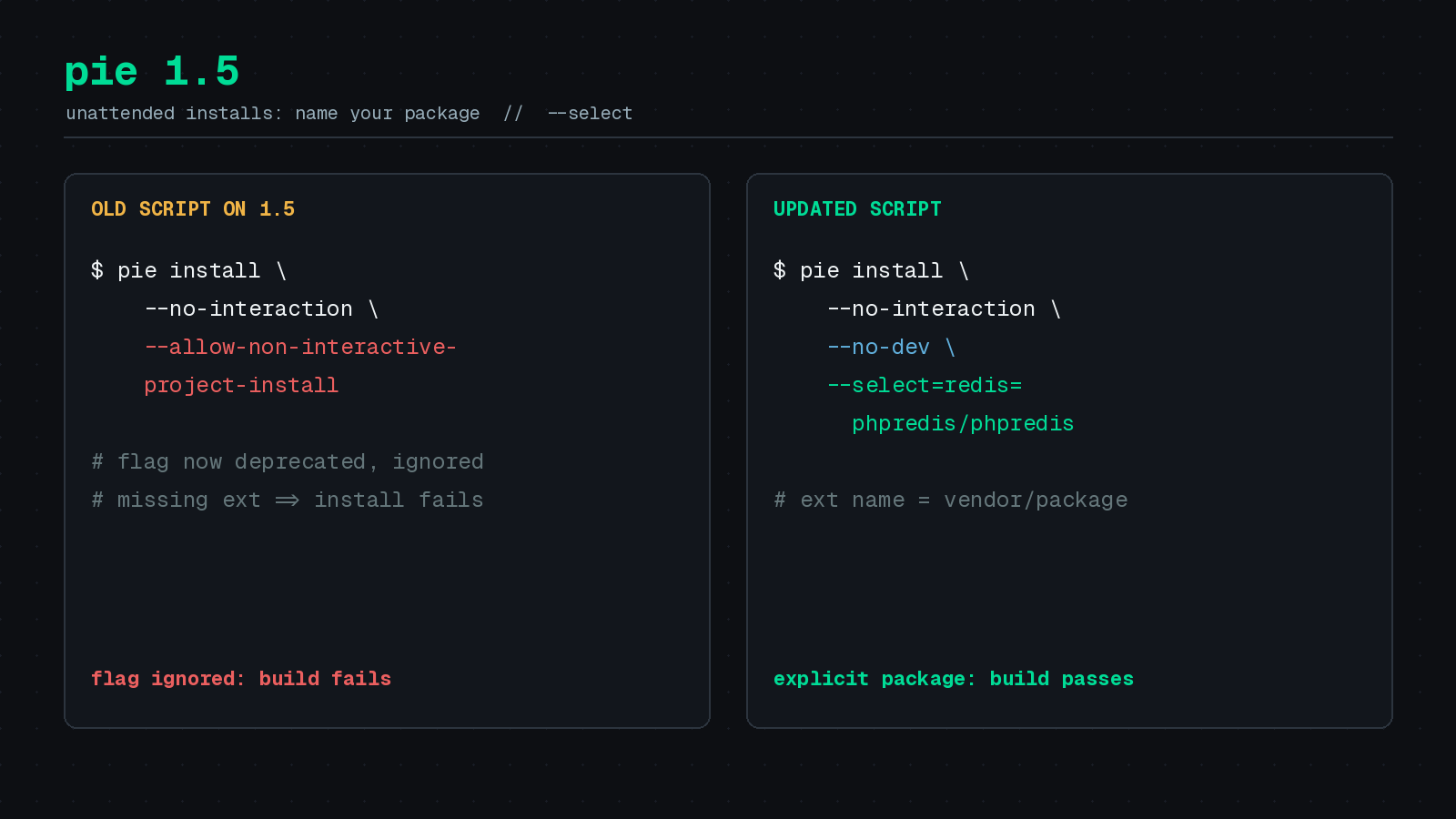
If your build pipeline calls pie install to pull in PHP extensions, check it before you let PIE move to 1.5. A flag many scripts rely on is now deprecated and ignored, and a missing extension will fail an unattended install instead of being picked for you.
PIE is the PHP Installer for Extensions, the PHP Foundation’s replacement for PECL. I covered the basics in As Easy as PIE. This post is about what changed in 1.5, which Laravel News covered on November 2, 2026, and the small edits that keep your builds green. The Foundation’s own announcement is the PIE 1.5 release post.
What changed in 1.5
According to Laravel News, PIE 1.5 adds three headline things: installing several extensions in one command, a new pie upgrade command, and a change to how unattended installs choose extension packages.
The third one is the breaking one. Earlier versions accepted --allow-non-interactive-project-install so PIE could choose packages without asking. In 1.5 that flag is deprecated and has no effect. If a project requires an extension that is not installed, and you did not say which package provides it, the unattended install fails.
That is a sensible change in my view. Choosing a package silently in a production build is a risky default, and making the build name its package removes the guesswork.
Why the old command now fails
Project-aware installs read the ext-* entries in your composer.json. Take a Laravel app that uses PhpRedis and Xdebug in development:
{
    "require": {
        "ext-redis": "*"
    },
    "require-dev": {
        "ext-xdebug": "*"
    }
}
The ext-redis line only declares that the runtime must provide the extension. It installs nothing. Laravel also supports the PHP-only Predis client, so you only need this entry when you use PhpRedis.
When you run pie install with no package arguments from the project directory, PIE checks those requirements. A script like this used to pick packages for you:
# Worked before 1.5. The flag is now ignored.
pie install --no-interaction --allow-non-interactive-project-install
On 1.5, that run fails if anything is missing, because nothing tells PIE which package to use for redis.
The fix: map each extension with —select
The new flag is --select. The left side is the extension name without the ext- prefix, and the right side is the Packagist package. For a production build of the example app:
pie install --no-interaction --no-dev \
    --select=redis=phpredis/phpredis
PIE checks whether Redis is already available and installs the selected package if it is not. Add one --select for each other extension that needs a package choice.
Notice --no-dev in that command. Without it, PIE also checks the extensions in require-dev, which would include Xdebug here. With --no-dev, production skips the development requirement and still gets Redis. Laravel News is careful to say what this flag does not do: it does not remove extensions already installed in PHP, and it does not replace composer install --no-dev for your application’s packages. You still need both.
For a development image that needs both extensions, select both:
pie install --no-interaction \
    --select=redis=phpredis/phpredis \
    --select=xdebug=xdebug/xdebug
One more note from the same article: this only affects project-based installs. If you already name the package, as in pie install phpredis/phpredis, nothing changes.
A CI example
Here is a GitHub Actions step for a hypothetical PHP Architect subscriber portal. It assumes PIE is already on the runner and that the build tools it needs are present:
- name: Install PHP extensions with PIE
  run: |
    pie check-build-tools
    pie install --no-interaction --no-dev \
      --select=redis=phpredis/phpredis
pie check-build-tools is new in 1.5. Per Laravel News, PIE does not automatically install missing build tools in non-interactive mode unless you ask it to, so the check gives you a clear failure early instead of a confusing compiler error halfway through. I have not tested this exact workflow on a runner, so treat it as a starting point and run it on a branch first.
Keeping extensions current with pie upgrade
The other useful addition is a separate maintenance command:
pie upgradeIt works on the target PHP installation and respects the version constraint recorded when each extension was installed. It does not touch Laravel or anything in your vendor directory. If you installed PhpRedis like this:
pie install 'phpredis/phpredis:^6.0'then later pie upgrade runs can pick up matching 6.x releases. Moving to 7.x means changing the constraint. Laravel News also notes that PIE carries configure options across upgrades, which saves you from rebuilding with the wrong flags.
Smaller additions
If your Dockerfile names extensions directly, you can now install several in a single command:
pie install phpredis/phpredis xdebug/xdebugThat means fewer layers and less repeated setup output in your build logs. There is also a new pie search command for finding package names before you write these commands, which helps when you are not sure what the Packagist name for an extension is. The release also updates PIE’s attestation verification library. The 1.5.0 release notes list the rest.
A short migration checklist
- Search your repos for
--allow-non-interactive-project-installin CI configs, Dockerfiles, and deploy scripts. - For each project, list its
ext-*requirements and decide which package provides each one. - Replace the old flag with one
--select=name=vendor/packageper extension. - Add
--no-devto production builds so development extensions are not checked. - Pin or test your PIE version in a branch build before you roll it out everywhere.
Why this matters
PIE is becoming the standard way to install native extensions, and the old PECL route is on its way out. A tool that guesses less is a tool you can trust in a pipeline. The cost is a few lines of explicit configuration, and the benefit is that your build says exactly which package it installed and why.
If you ship containers, the same discipline applies to the rest of your supply chain. The recent PHP security release checklist is a good reminder that extension and runtime updates belong in your regular maintenance routine, not just your emergency one.
Sources
- PIE 1.5 Changes PHP Extension Installs in CI, Laravel News, November 2, 2026
- PIE 1.5 released, The PHP Foundation
- PIE 1.5.0 release notes, GitHub
- PIE 1.5 usage documentation, GitHub